Don't miss your chance to take the Fabric Data Engineer (DP-700) exam on us!
Learn moreNext up in the FabCon + SQLCon recap series: The roadmap for Microsoft SQL and Maximizing Developer experiences in Fabric. All sessions are available on-demand after the live show. Register now
Hi,
Currently I have many widgets (Cards, Pie Chart, Custom Visuals) also Bar chart in dashboard. Whenever I click on any Bar it refreshes all other compoenent (it takes few seconds to do that). There is no action on Bar chart however. I checked interaction between charts and disabled interactions. But still it is happening. Please advice.
Thank you in advnace.
Hi,
Yes i am having the same issues.
@Anonymous
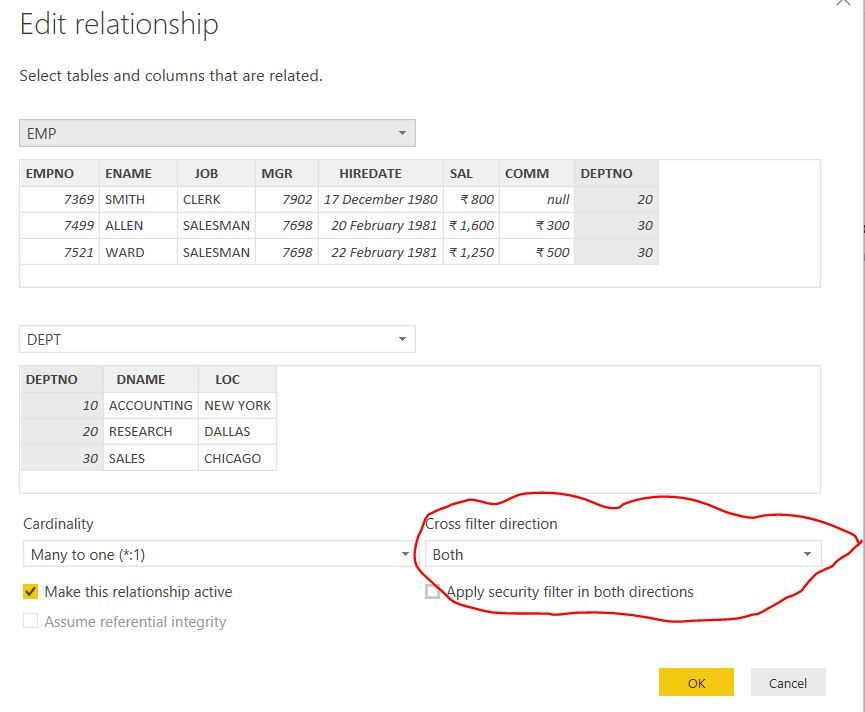
Is that data model have the proper relationships in between the tables.
Can you refer the below link to change the filer direction. (Single/Both)
If this post was helpful may I ask you to mark it as solution and give it some kudos?
If I understand correctly, you are having problems with the bar chart not changing when you click on something? If so, when you click on a chart, that specific chart you clicked on will only highlight what you clicked, while other charts will change its visual to only the thing that you clicked in the chart.
If you have recently started exploring Fabric, we'd love to hear how it's going. Your feedback can help with product improvements.
A new Power BI DataViz World Championship is coming this June! Don't miss out on submitting your entry.
Share feedback directly with Fabric product managers, participate in targeted research studies and influence the Fabric roadmap.