Join us at FabCon Atlanta from March 16 - 20, 2026, for the ultimate Fabric, Power BI, AI and SQL community-led event. Save $200 with code FABCOMM.
Register now!The Power BI Data Visualization World Championships is back! Get ahead of the game and start preparing now! Learn more
Hi, When I add an entity in dataflow connecting to Azure synapse. it doest not show me Import or Direct Query like it does in Power BI Desktop. How can we determine if it is on Import or Direct query mode?
Thanks in advance
Solved! Go to Solution.
Hi, @Anonymous
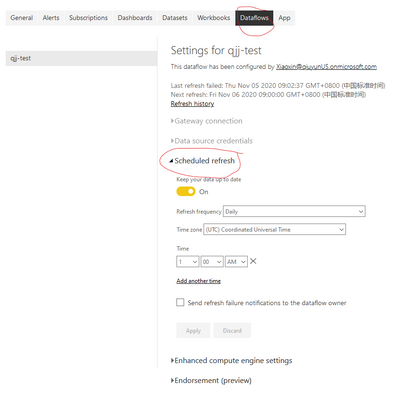
I think that the easiest way to identify the connection mode of a dataset/dataflow is going to settings->dataset/dataflow, check if it displays "Schedule refresh", like this:
Because "Scheduled refresh" is only for Import mode. If you can't find it, then you can determine that it must be a direct query or live connect.
Best Regards,
Community Support Team _Robert Qin
If this post helps, then please consider Accept it as the solution to help the other members find it more quickly.
Hi, @Anonymous
I think that the easiest way to identify the connection mode of a dataset/dataflow is going to settings->dataset/dataflow, check if it displays "Schedule refresh", like this:
Because "Scheduled refresh" is only for Import mode. If you can't find it, then you can determine that it must be a direct query or live connect.
Best Regards,
Community Support Team _Robert Qin
If this post helps, then please consider Accept it as the solution to help the other members find it more quickly.
The Power BI Data Visualization World Championships is back! Get ahead of the game and start preparing now!
| User | Count |
|---|---|
| 56 | |
| 55 | |
| 31 | |
| 18 | |
| 14 |