Join us at FabCon Atlanta from March 16 - 20, 2026, for the ultimate Fabric, Power BI, AI and SQL community-led event. Save $200 with code FABCOMM.
Register now!The Power BI Data Visualization World Championships is back! Get ahead of the game and start preparing now! Learn more
Hi,
I have created report with data imported from SSAS model on Azure service , in this case I don't need any gateway to refresh my data ( I think so ).
Some time ago I got message that schedule refresh in this case is not supported.
What about refresh on demand ? I couldn't do that even, I would like to ask if it is not supported too ?
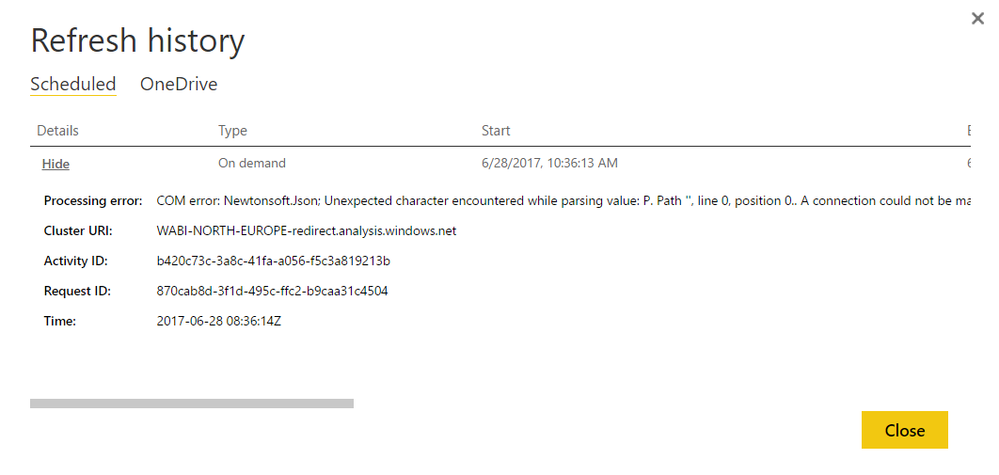
I tried to refresh data manually but I got error :
Solved! Go to Solution.
You choose “Import” mode in Power BI Desktop to connect to Azure Analysis Services and refresh your dataset in Power BI Service, right? If so, the feature( refresh model on Power BI Service with Azure AS data source in import mode) is not supported.
Please choose “Connect Live” to Azure as in Power BI Desktop and check if you get any refresh issues is Power BI Service.
Regards,
You choose “Import” mode in Power BI Desktop to connect to Azure Analysis Services and refresh your dataset in Power BI Service, right? If so, the feature( refresh model on Power BI Service with Azure AS data source in import mode) is not supported.
Please choose “Connect Live” to Azure as in Power BI Desktop and check if you get any refresh issues is Power BI Service.
Regards,
Yes I used import mode to create model, so in this case I will have to implement it to my SSAS tabular model.
I thought that maybe refresh on demand will work, now I know that also will not 🙂
Thanks for help !
The Power BI Data Visualization World Championships is back! Get ahead of the game and start preparing now!