I have two workspaces (WorkspaceA and WorkspaceB) set up in PowerBI Web each containing independant datasets that connect to the same Azure SQL Database.
The database contains multiple schemas (SchemaA and SchemaB). Two users have been set up on the database (UserA and UserB) with minimal read access to their respective schemas. UserA should not be able to access SchemaB and UserB should not be able to access SchemaA.
Credentials are entered into this form from within the dataset settings for each workspace -
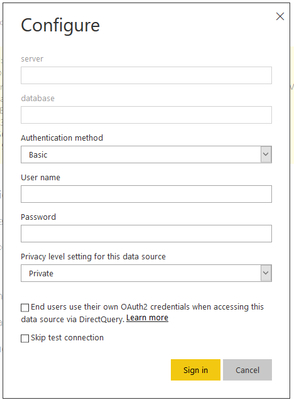
In PowerBI I enter my connection details for the Azure SQL datasource in WorkspaceA -
| server | my-test-sqlserver.database.windows.net |
| database | my-test-database |
| Authentication method | Basic |
| User name | UserA |
| Password | user_a_password |
| Privacy level | Private |
I can then sign in and refresh the dataset with no issues.
I then setup the connection details for the Azure SQL datasource in WorkspaceB -
| server | my-test-sqlserver.database.windows.net |
| database | my-test-database |
| Authentication method | Basic |
| User name | UserB |
| Password | user_b_password |
| Privacy level | Private |
I can then sign in and refresh this dataset with no issues but if I then switch back to WorkspaceA and force a manual refresh of its dataset, I will then encounter this error -
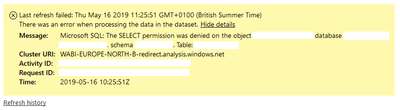
The credentials entered for WorkspaceA's datasource have been overriden by the credentials for WorkspaceB's datasource even though each datasource has been set up with a privacy level of private, created within seperate datasets and published to seperate workspaces.
It seems the datasource credentials are tied to me as a user and identified based on the target database and server and are following me between workspaces rather than be restricted to a unique dataset which was the behaviour I had anticipated. Is there a setting somewhere that I may have missed that could resolve this or is this an issue with how datasource credentials are stored that may require some changes by Microsoft?
Changes to the permissions setup on the SQL side are not an option.
Any help is much appreciated.
Thanks!


