cancel
Showing results for 
Search instead for 
Did you mean: 

Join the FabCon + SQLCon recap series. Up next: Power BI, Real-Time Intelligence, IQ and AI, and Data Factory take center stage. All sessions are available on-demand after the live show. Register now

Reply
Anonymous
Not applicable

Automatic Incremental refresh issue

Hi, 

Since we switch to 2021, the automatic incremental do something really weird, when i do a manual refresh of Power Bi Desktop, everything going well and I can publish it to my Power Bi service but when I launch an incremental refresh on Service, it's working but at the end the data of january are deleted and my data stop to 30/12/2020. I've already checked my range start/end, all my incremental parameters and nothing seems to explain why this behavior for the automatic incremental refresh. 

Everything is on Sharepoint with CSV or XLS.

Thank you for your help. 

6 REPLIES 6
GilbertQ
Super User
Super User

Hi @Anonymous 


I think you need to ensure you only have got CSV and XLSX files and not any XLS files. I know that XLS files will not refresh via the Power BI Service.


Did I answer your question? Mark my post as a solution!

Proud to be a Super User!


Power BI Blog

Anonymous
Not applicable

oh really, i didn't know this.
I checked it and all my datafiles are CSV or XLSX

Hi @Anonymous 


What happens when you re-upload the PBIX and then configure the dataset data source.


And then refresh it twice?

The first time creates the partitions, the second time should then only do the incremental refresh.


Also how exactly have you configured your incremental refresh policy?


Did I answer your question? Mark my post as a solution!

Proud to be a Super User!


Power BI Blog

Anonymous
Not applicable

Hi,

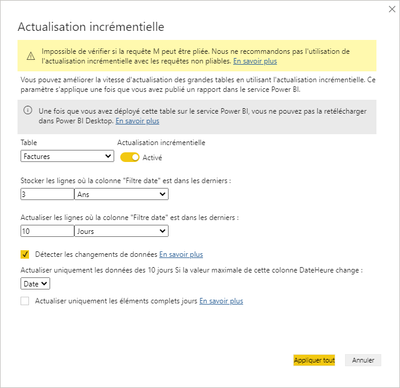
obsviously, I tried this, and I tried with a new file too and the result is the same on Power Bi Service.

This is my incremental configuration.

tchoffatWB_1-1611301991550.png


GilbertQ
Super User
Super User

Hi @Anonymous 


What is the range in your incremental configuration that you have set?


Also can you confirm that the CSV and XLS (This should be XLSX files) have the most recent data.

NOTE: If you have XLS files you will have an issue with it refreshing via the Power BI Service.


Did I answer your question? Mark my post as a solution!

Proud to be a Super User!


Power BI Blog

Anonymous
Not applicable

Hi Gilbert, 

Yes the files have most recent data, as said, when I do a manual refresh from power BI desktop, everything going well and I've all the data.

I've CSV, XLS and XLSX

The range start ist 01/01/2018
The range end is 01/01/2022

Thanks for helping

Helpful resources

Announcements
April Power BI Update Carousel

Power BI Monthly Update - April 2026

Check out the April 2026 Power BI update to learn about new features.

New to Fabric survey Carousel

New to Fabric Survey

If you have recently started exploring Fabric, we'd love to hear how it's going. Your feedback can help with product improvements.

Power BI DataViz World Championships carousel

Power BI DataViz World Championships - June 2026

A new Power BI DataViz World Championship is coming this June! Don't miss out on submitting your entry.

FabCon and SQLCon Highlights Carousel

FabCon &SQLCon Highlights

Experience the highlights from FabCon & SQLCon, available live and on-demand starting April 14th.