cancel
Showing results for 
Search instead for 
Did you mean: 

Get Fabric Certified for FREE during Fabric Data Days. Don't miss your chance! Request now

Reply
dsinko_ileso
New Member

Another problem with refreshing the dashboard

Hi everyone,


I know a similar question was posted already but I can't get it to work. Our dashboard won't refresh after we refresh our dataset, even after 15 minutes. It won't refresh even if I click on "More options -> Refresh". The only thing that works is if I refresh the whole page in the browser. We tried it with Edge and Chrome on different PCs and everywhere it is the same. We tried Power BI a month or two ago and I know that it worked back then. We are getting our data from an Excel file stored online on OneDrive. Is this a bug? Has anyone reported such problem recently?


Thanks 😊

David

1 ACCEPTED SOLUTION
dsinko_ileso
New Member

The guys from the support told me that only when you create a dashboard from individual visuals the dashboard will be automatically refreshed. My error was that I clicked "Pin a live page" from a report - this way the dashboard will stay the same until you refresh the whole page in your browser.

View solution in original post

3 REPLIES 3
dsinko_ileso
New Member

The guys from the support told me that only when you create a dashboard from individual visuals the dashboard will be automatically refreshed. My error was that I clicked "Pin a live page" from a report - this way the dashboard will stay the same until you refresh the whole page in your browser.

v-lionel-msft
Community Support
Community Support

Hi @dsinko_ileso ,


" Our dashboard won't refresh after we refresh our dataset, even after 15 minutes. It won't refresh even if I click on "More options -> Refresh". "


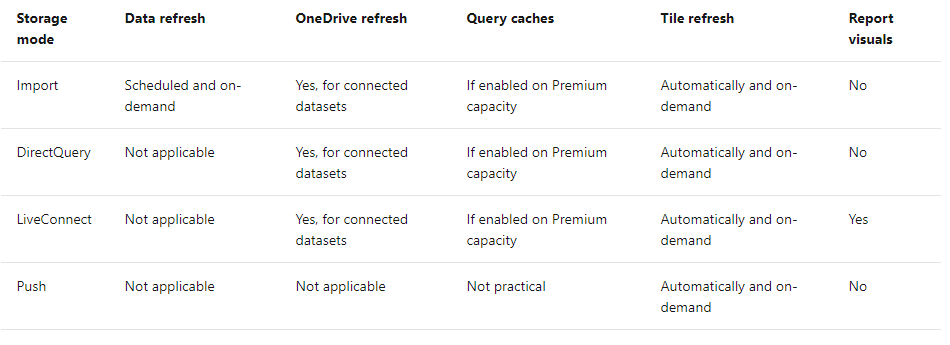
1. Automatic refresh of tiles
The tiles in the dashboard will automatically refresh when your dataset is refreshed but only after your report is refreshed.

(The report will generally be refreshed the next time you enter the Power BI Service, for example, if you refresh the URL of Service in the browser. You can also choose to refresh the report manually. )
2. Manual refresh of tiles
After your dataset is refreshed, even if the report is not refreshed, you can also use manual refresh to force tile refresh.

(But it seems that you have encountered a problem with the manual refresh. Please make sure that your dataset has completed the refresh process before attempting a manual refresh.)
 

xxx3.PNG

Tile refresh 


Best regards,
Lionel Chen

If this post helps, then please consider Accept it as the solution to help the other members find it more quickly.


Greg_Deckler
Community Champion
Community Champion

You could check the Issues forum here:

https://community.powerbi.com/t5/Issues/idb-p/Issues

And if it is not there, then you could post it.

If you have Pro account you could try to open a support ticket. If you have a Pro account it is free. Go to https://support.powerbi.com. Scroll down and click "CREATE SUPPORT TICKET".


Follow on LinkedIn
@ me in replies or I'll lose your thread!!!
Instead of a Kudo, please vote for this idea
Become an expert!: Enterprise DNA
External Tools: MSHGQM
YouTube Channel!: Microsoft Hates Greg
Latest book!:
DAX For Humans

DAX is easy, CALCULATE makes DAX hard...

Helpful resources

Announcements
November Power BI Update Carousel

Power BI Monthly Update - November 2025

Check out the November 2025 Power BI update to learn about new features.

Fabric Data Days Carousel

Fabric Data Days

Advance your Data & AI career with 50 days of live learning, contests, hands-on challenges, study groups & certifications and more!

FabCon Atlanta 2026 carousel

FabCon Atlanta 2026

Join us at FabCon Atlanta, March 16-20, for the ultimate Fabric, Power BI, AI and SQL community-led event. Save $200 with code FABCOMM.

Top Solution Authors
Top Kudoed Authors