Don't miss your chance to take the Fabric Data Engineer (DP-700) exam on us!
Learn moreWe've captured the moments from FabCon & SQLCon that everyone is talking about, and we are bringing them to the community, live and on-demand. Starts on April 14th. Register now
We have a software that utilizes BI to report on its stored data.
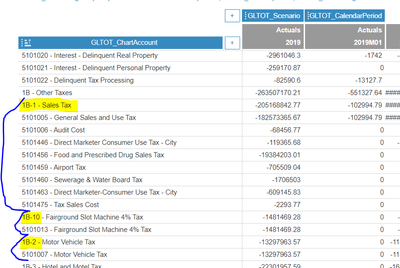
There is a certain dashboard built that there is a hierarchy in place for how the data is displayed. Now the names of the headers for each hierarchy is what the entire dataset is ordered by. But these names are ordered alphanumerically which is causing an issue with the ordering.
For example: the headings are currently ordered B-1, B-10, and B-2. When they should be ordered B-1, B-2, B-10. This is included in a screenshot below. Is there a way to have BI reorder these without changing the hierarchy and keeping all of the data groups properly grouped together?
Solved! Go to Solution.
Add a column to your data model that indicates the desired sort order and then sort your header column by that column.
Sort one column by another column in Power BI - Power BI | Microsoft Learn
Add a column to your data model that indicates the desired sort order and then sort your header column by that column.
Sort one column by another column in Power BI - Power BI | Microsoft Learn
If you have recently started exploring Fabric, we'd love to hear how it's going. Your feedback can help with product improvements.
A new Power BI DataViz World Championship is coming this June! Don't miss out on submitting your entry.
Share feedback directly with Fabric product managers, participate in targeted research studies and influence the Fabric roadmap.
| User | Count |
|---|---|
| 29 | |
| 23 | |
| 17 | |
| 16 | |
| 14 |