cancel
Showing results for 
Search instead for 
Did you mean: 

The Power BI Data Visualization World Championships is back! Get ahead of the game and start preparing now! Learn more

Reply
BerlinAlexander
Helper II
Helper II

API connection - how to set up automatic refresh?

I designed a dashboard with API as a data source. Let me quote some excerpts:


let

Source = Json.Document(Web.Contents(let today = DateTime.Date(DateTime.LocalNow()) in
"[website]" &
Number.ToText(Date.Year(today)) & "-" &
Text.PadStart(Number.ToText(Date.Month(today)-1),2,"0") & "-" &
Text.PadStart(Number.ToText(Date.Day(today)-1),2,"0") &
"&date-to=" &
Number.ToText(Date.Year(today)) & "-" &
Text.PadStart(Number.ToText(Date.Month(today)),2,"0") & "-" &
Text.PadStart(Number.ToText(Date.Day(today)-1),2,"0") 
in
#Source


It works perfectly when I click on "refresh" in PowerBI Desktop. 


My goal is, however, for the published dashboard to refresh automatically.


It doesn't work. I can't create a dataflow using the script above (message: the source is dynamic). Refreshing the data set gives me an error message too.


Any ideas?

1 REPLY 1
darentengmfs
Post Prodigy
Post Prodigy

@BerlinAlexander 


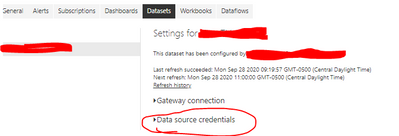
Have you set up your datasource credentials for the API?


darentengmfs_0-1601304228091.png


Helpful resources

Announcements
Power BI DataViz World Championships

Power BI Dataviz World Championships

The Power BI Data Visualization World Championships is back! Get ahead of the game and start preparing now!

December 2025 Power BI Update Carousel

Power BI Monthly Update - December 2025

Check out the December 2025 Power BI Holiday Recap!

FabCon Atlanta 2026 carousel

FabCon Atlanta 2026

Join us at FabCon Atlanta, March 16-20, for the ultimate Fabric, Power BI, AI and SQL community-led event. Save $200 with code FABCOMM.