
Join us at FabCon Atlanta from March 16 - 20, 2026, for the ultimate Fabric, Power BI, AI and SQL community-led event. Save $200 with code FABCOMM.
Register now!Vote for your favorite vizzies from the Power BI Dataviz World Championship submissions. Vote now!
Hi @bhou ,
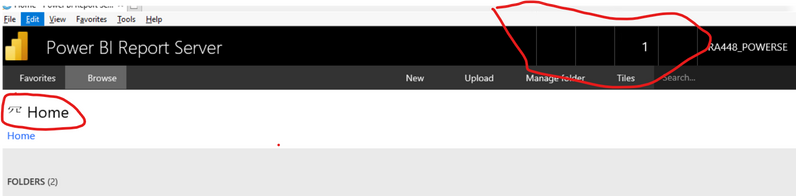
Did you mean that the icon options in the screenshot below cannot be displayed?
Try to switch to another browser and reopen it or clear the browser cache and reopen it. Does it help? please let me know the result as soon as possible.
Best Regards,
Henry
If this post helps, then please consider Accept it as the solution to help the other members find it more quickly.
change the browser to chrome solve the problem, thanks all !
Hi @bhou ,
Did you mean that the icon options in the screenshot below cannot be displayed?
Try to switch to another browser and reopen it or clear the browser cache and reopen it. Does it help? please let me know the result as soon as possible.
Best Regards,
Henry
If this post helps, then please consider Accept it as the solution to help the other members find it more quickly.
These icons come from an icon font that is normally served up from the portal and cached on the browser. Maybe trying clearing the cache on your browser.
Vote for your favorite vizzies from the Power BI World Championship submissions!
If you love stickers, then you will definitely want to check out our Community Sticker Challenge!
Check out the January 2026 Power BI update to learn about new features.
| User | Count |
|---|---|
| 3 | |
| 2 | |
| 1 | |
| 1 | |
| 1 |
| User | Count |
|---|---|
| 6 | |
| 4 | |
| 3 | |
| 3 | |
| 2 |