Join us at FabCon Atlanta from March 16 - 20, 2026, for the ultimate Fabric, Power BI, AI and SQL community-led event. Save $200 with code FABCOMM.
Register now!The Power BI Data Visualization World Championships is back! It's time to submit your entry. Live now!
Hi,
I am very new to paginated reports. I was looking through training material for parameters, but I could not find any information on how to define a parameter for which I could enter parameter values(s) manually (like pop-up box), which would then provide me a report for the entered values(s). What I found was only building a dropdown.
For example, I have 1000+ invoices and I need to define a parameter which would request entry of invoices number(s), and subsequently provide a report for the invoices entered.
Please assist.
Thanks,
Muralidhar
Solved! Go to Solution.
Hello!
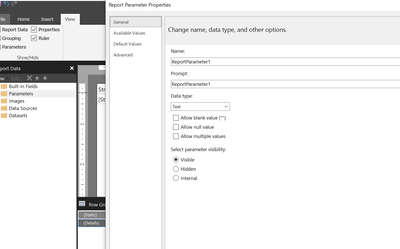
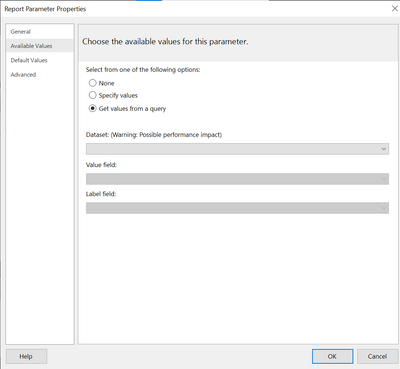
Please add a parameter as below and select appropriate option. If you want your parameter to be multi valued you may select Multi, also if you want it pre -populated with all Invoices then go to Available values and populate the values from a dataset. Please let me know if you face any issues .
Hello!
Please add a parameter as below and select appropriate option. If you want your parameter to be multi valued you may select Multi, also if you want it pre -populated with all Invoices then go to Available values and populate the values from a dataset. Please let me know if you face any issues .
You can use a query to populate the dropdown. Look for that in Google and I bet you will find something that will work for you.
The Power BI Data Visualization World Championships is back! It's time to submit your entry.
Check out the January 2026 Power BI update to learn about new features.
| User | Count |
|---|---|
| 3 | |
| 2 | |
| 2 | |
| 1 | |
| 1 |
| User | Count |
|---|---|
| 4 | |
| 3 | |
| 3 | |
| 1 | |
| 1 |