cancel
Showing results for 
Search instead for 
Did you mean: 

The Power BI Data Visualization World Championships is back! Get ahead of the game and start preparing now! Learn more

Reply
YasminG
New Member

missing date slider

Hi all


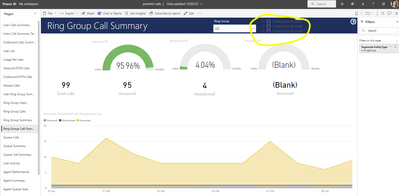
I am not sure if I am in the right place, I am new to Power Bii. I have lost the date slider in the top right and it has been replaced by tick boxes. How can I get back to the usual slider?


YasminG_0-1676290109602.png

Thanks

Yas

1 REPLY 1
jaweher899
Impactful Individual

Please check the data type of your date field to make sure it's set to "Date" or "Date/Time" and not "Text" or "Number". If it's not set to the correct data type, you may need to change the data type in the data model and refresh the visuals.

Helpful resources

Announcements
Power BI DataViz World Championships

Power BI Dataviz World Championships

The Power BI Data Visualization World Championships is back! Get ahead of the game and start preparing now!

December 2025 Power BI Update Carousel

Power BI Monthly Update - December 2025

Check out the December 2025 Power BI Holiday Recap!

FabCon Atlanta 2026 carousel

FabCon Atlanta 2026

Join us at FabCon Atlanta, March 16-20, for the ultimate Fabric, Power BI, AI and SQL community-led event. Save $200 with code FABCOMM.