cancel
Showing results for 
Search instead for 
Did you mean: 

Data Days is here! Join us now for 60+ days of learning, challenges, and connection. Learn more

Reply
GunnerJ
Post Patron
Post Patron

User can't export data

For some reason my end users don't have the option to export on any visual after I've published it. I can but I'm the owner so I assume I have special priveldges. In the settings I have it where they can export summarized and underlying data. Still that has not helped as the option to export still doesn't show up. Any help as to what I could be missing would be greatly appreciated. 


3 REPLIES 3
saykasku
Resolver I
Resolver I

Hi,


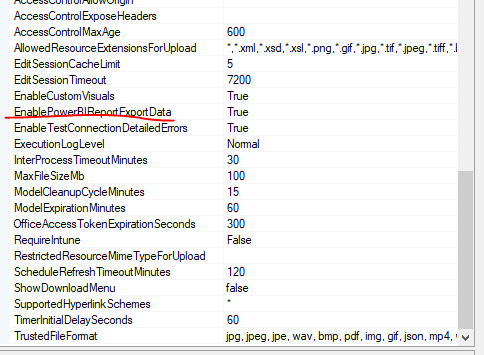
check this configs:rsset.PNG

An check user permissions on RS. More info here:
https://docs.microsoft.com/en-us/sql/reporting-services/security/role-definitions-predefined-roles?v...

@saykasku where do you go to see the configurations?

1. You need to connect to RS via SSMS
https://docs.microsoft.com/en-us/sql/reporting-services/tools/connect-to-a-report-server-in-manageme...
2. Right click on server instance and Properties

3. Configs are in Advenced tab

Helpful resources

Announcements
Fabric Data Days is here Carousel

Fabric Data Days 2026

Don't miss out on Data Days, June 15 through August 7. Learn Fabric, Power BI, SQL, AI and more.

May Power BI Update Carousel

Power BI Monthly Update - May 2026

Check out the May 2026 Power BI update to learn about new features.

Power BI DataViz World Championships carousel

Power BI DataViz World Championships - June 2026

A new Power BI DataViz World Championship is coming this June! Don't miss out on submitting your entry.