Don't miss your chance to take the Fabric Data Engineer (DP-600) exam for FREE! Find out how by watching the DP-600 session on-demand now through April 28th.
Learn moreJoin the FabCon + SQLCon recap series. Up next: Power BI, Real-Time Intelligence, IQ and AI, and Data Factory take center stage. All sessions are available on-demand after the live show. Register now
This might be a stupid question, but when you update from an old version of Report Server to the newest one, do you just run the PowerBIReportServer.exe file from your computer? Does it prompt you for which Server you are wanting to update the version on?
Solved! Go to Solution.
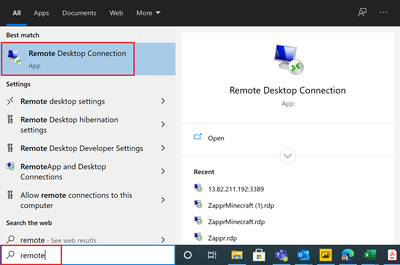
@meddojeddo - Use Remote Desktop Connection.
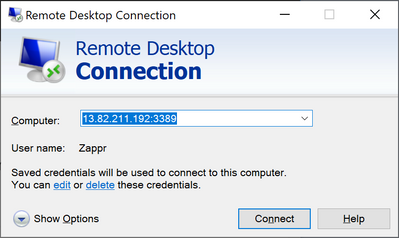
You would enter the computer/server name or IP address in the Computer area. You will then kind of go through a wizard to get logged on to the computer. So you will end up with a window that is essentially as if you were physically logged on to the computer.
@meddojeddo - Follow the directions here:
@Greg_Deckler I am following those instructions, and I am at the step where it asks you for a product key when you launch the installer. I am just making sure that I am supposed to be launching the installer from my compter and that this will allow me to specify the server which I am upgrading. It doesn's specify that in the instructions.
@meddojeddo I would highly recommend running the update on the actual server.
@Greg_Deckler is there a guide which details how to log into the server and do that?
@meddojeddo - Use Remote Desktop Connection.
You would enter the computer/server name or IP address in the Computer area. You will then kind of go through a wizard to get logged on to the computer. So you will end up with a window that is essentially as if you were physically logged on to the computer.
Check out the April 2026 Power BI update to learn about new features.
If you have recently started exploring Fabric, we'd love to hear how it's going. Your feedback can help with product improvements.
A new Power BI DataViz World Championship is coming this June! Don't miss out on submitting your entry.
| User | Count |
|---|---|
| 3 | |
| 3 | |
| 2 | |
| 2 | |
| 2 |
| User | Count |
|---|---|
| 5 | |
| 3 | |
| 3 | |
| 3 | |
| 3 |