Join us at FabCon Atlanta from March 16 - 20, 2026, for the ultimate Fabric, Power BI, AI and SQL community-led event. Save $200 with code FABCOMM.
Register now!Vote for your favorite vizzies from the Power BI Dataviz World Championship submissions. Vote now!
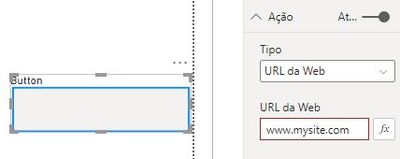
Olá pessoal, na imagem acima tenho um botão com link que leva para outro site.
Ao clicar no botão o navegador me abre uma nova guia.
o que eu preciso:
Quero abrir na mesma guia o link, isso é possivel?
Atenciosamente,
Edson.
Solved! Go to Solution.
As of now, you cannot redirect your Power BI Report page to another page. This action will always open a new page in a browser.
But one workaround(Hypothesis, I haven't done yet but a possibility) that you can do is to create a new Page in Power BI Desktop and use the HTML visual in it and write the code to open the web URL in it.
Ref: https://community.powerbi.com/t5/Desktop/Web-Page-Display-in-Power-BI-Desktop/td-p/994676
Then you should use Page Navigation in Action Button that will navigate to the above page and you will see the website.
Proud to be a Super User!
Isso acontece por você está colocando o texto do botão no lugar "título".
Apague de "título" e coloque em Estilo "texto".
As of now, you cannot redirect your Power BI Report page to another page. This action will always open a new page in a browser.
But one workaround(Hypothesis, I haven't done yet but a possibility) that you can do is to create a new Page in Power BI Desktop and use the HTML visual in it and write the code to open the web URL in it.
Ref: https://community.powerbi.com/t5/Desktop/Web-Page-Display-in-Power-BI-Desktop/td-p/994676
Then you should use Page Navigation in Action Button that will navigate to the above page and you will see the website.
Proud to be a Super User!
Vote for your favorite vizzies from the Power BI World Championship submissions!
If you love stickers, then you will definitely want to check out our Community Sticker Challenge!
Check out the January 2026 Power BI update to learn about new features.
| User | Count |
|---|---|
| 5 | |
| 4 | |
| 4 | |
| 3 | |
| 2 |