cancel
Showing results for 
Search instead for 
Did you mean: 

Try your skills in the Power BI Dataviz World Championship! Round one ends June 26. Join now

Reply
EdsonGomes
Frequent Visitor

URL da Web

Forum.JPG


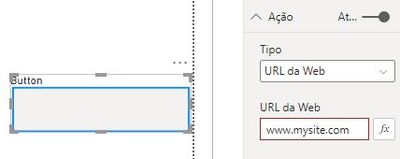
Olá pessoal, na imagem acima tenho um botão com link que leva para outro site.

Ao clicar no botão o navegador me abre uma nova guia.

o que eu preciso:

Quero abrir na mesma guia o link, isso é possivel?


Atenciosamente,

Edson.

1 ACCEPTED SOLUTION
FarhanAhmed
Community Champion
Community Champion

As of now, you cannot redirect your Power BI Report page to another page. This action will always open a new page in a browser.


But one workaround(Hypothesis, I haven't done yet but a possibility) that you can do is to create a new Page in Power BI Desktop and use the HTML visual in it and write the code to open the web URL in it.


Ref: https://community.powerbi.com/t5/Desktop/Web-Page-Display-in-Power-BI-Desktop/td-p/994676


Then you should use Page Navigation in Action Button that will navigate to the above page and you will see the website.


Did I answer your question? Mark my post as a solution! Appreciate your Kudos!!

Proud to be a Super User!


View solution in original post

2 REPLIES 2
Anonymous
Not applicable

Isso acontece por você está colocando o texto do botão no lugar "título".
Apague de "título" e coloque em Estilo "texto".

FarhanAhmed
Community Champion
Community Champion

As of now, you cannot redirect your Power BI Report page to another page. This action will always open a new page in a browser.


But one workaround(Hypothesis, I haven't done yet but a possibility) that you can do is to create a new Page in Power BI Desktop and use the HTML visual in it and write the code to open the web URL in it.


Ref: https://community.powerbi.com/t5/Desktop/Web-Page-Display-in-Power-BI-Desktop/td-p/994676


Then you should use Page Navigation in Action Button that will navigate to the above page and you will see the website.


Did I answer your question? Mark my post as a solution! Appreciate your Kudos!!

Proud to be a Super User!


Helpful resources

Announcements
Fabric Data Days is here Carousel

Fabric Data Days 2026

Don't miss out on Data Days, June 15 through August 7. Learn Fabric, Power BI, SQL, AI and more.

May Power BI Update Carousel

Power BI Monthly Update - May 2026

Check out the May 2026 Power BI update to learn about new features.

Power BI DataViz World Championships carousel

Power BI DataViz World Championships - June 2026

A new Power BI DataViz World Championship is coming this June! Don't miss out on submitting your entry.