FabCon is coming to Atlanta
Join us at FabCon Atlanta from March 16 - 20, 2026, for the ultimate Fabric, Power BI, AI and SQL community-led event. Save $200 with code FABCOMM.
Register now!- Power BI forums
- Get Help with Power BI
- Desktop
- Service
- Report Server
- Power Query
- Mobile Apps
- Developer
- DAX Commands and Tips
- Custom Visuals Development Discussion
- Health and Life Sciences
- Power BI Spanish forums
- Translated Spanish Desktop
- Training and Consulting
- Instructor Led Training
- Dashboard in a Day for Women, by Women
- Galleries
- Data Stories Gallery
- Themes Gallery
- Contests Gallery
- QuickViz Gallery
- Quick Measures Gallery
- Visual Calculations Gallery
- Notebook Gallery
- Translytical Task Flow Gallery
- TMDL Gallery
- R Script Showcase
- Webinars and Video Gallery
- Ideas
- Custom Visuals Ideas (read-only)
- Issues
- Issues
- Events
- Upcoming Events
The Power BI Data Visualization World Championships is back! Get ahead of the game and start preparing now! Learn more
- Power BI forums
- Forums
- Get Help with Power BI
- Report Server
- Re: URL FIlter is not workin in Power BI Report Se...
- Subscribe to RSS Feed
- Mark Topic as New
- Mark Topic as Read
- Float this Topic for Current User
- Bookmark
- Subscribe
- Printer Friendly Page

- Mark as New
- Bookmark
- Subscribe
- Mute
- Subscribe to RSS Feed
- Permalink
- Report Inappropriate Content
URL FIlter is not workin in Power BI Report Server
Hi all, I am trying to filter my PBIRS report but it's not working. I am using the syntax ?filter=table/field eq 'value'. It looks like it is understanding the syntax, but it's not passing the value. It's returning the field I am trying to filtering with a caution sign and filtering is(all).
PBRIS is on premise, I was wondering if that's why it is not working?
Cheers!!
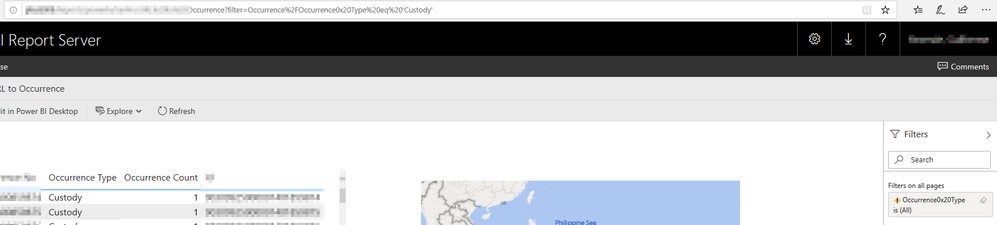
Solved! Go to Solution.


- Mark as New
- Bookmark
- Subscribe
- Mute
- Subscribe to RSS Feed
- Permalink
- Report Inappropriate Content
Hi @Guilligam ,
Power BI Report Server does support URL filter. Try something like this:
https://reportserver/reports/powerbi/YourReport?rs:Embed=true&filter=Occurrence/Occurrence_x0020_Type eq 'Custody'
Reference: Filter a report using query string parameters in the URL
- Power BI Report Server also supports the ability to specify additional filters using the “filter” URL parameter. Here's an example of what the URL might look like in Power BI Report Server:
https://reportserver/reports/powerbi/Store Sales?rs:Embed=true&filter= Store/Territory eq 'NC' and Store/Chain eq 'Fashions Direct'
Best Regards,
Icey
If this post helps, then please consider Accept it as the solution to help the other members find it more quickly.
- Mark as New
- Bookmark
- Subscribe
- Mute
- Subscribe to RSS Feed
- Permalink
- Report Inappropriate Content
Hi, I am unable to use this filter,
https://app.powerbi.com/reportEmbed?reportId=7cd067fc-2180-4001-93fe-bc1b2bd4c15d&autoAuth=true&ctid... in ('Shipper')
- Mark as New
- Bookmark
- Subscribe
- Mute
- Subscribe to RSS Feed
- Permalink
- Report Inappropriate Content
Thanks All. Apparently Power Bi doesn't support URL filter on premises. It looks like that the only solution is using Paginated Report.
I tested and it works fine. Hopefuly Power BI Report Server get URL filter as a option in the future.
- Mark as New
- Bookmark
- Subscribe
- Mute
- Subscribe to RSS Feed
- Permalink
- Report Inappropriate Content
Hi @Guilligam ,
Power BI Report Server does support URL filter. Try something like this:
https://reportserver/reports/powerbi/YourReport?rs:Embed=true&filter=Occurrence/Occurrence_x0020_Type eq 'Custody'
Reference: Filter a report using query string parameters in the URL
- Power BI Report Server also supports the ability to specify additional filters using the “filter” URL parameter. Here's an example of what the URL might look like in Power BI Report Server:
https://reportserver/reports/powerbi/Store Sales?rs:Embed=true&filter= Store/Territory eq 'NC' and Store/Chain eq 'Fashions Direct'
Best Regards,
Icey
If this post helps, then please consider Accept it as the solution to help the other members find it more quickly.


- Mark as New
- Bookmark
- Subscribe
- Mute
- Subscribe to RSS Feed
- Permalink
- Report Inappropriate Content
Hi, I noticed that "occurrence type" in your table is all "custody". It seems that filtering is OK, If not, you should give a counter example to prove that the filter fails (At least I didn't find any problems in the pictures you provided).
For me, PBIRS URL filtering is working (pic as below).

I think you can double check your filter URL and try again.
Good luck!


- Mark as New
- Bookmark
- Subscribe
- Mute
- Subscribe to RSS Feed
- Permalink
- Report Inappropriate Content
you need to escape Occurrence Type as
Occurrence_x0020_Type
- Mark as New
- Bookmark
- Subscribe
- Mute
- Subscribe to RSS Feed
- Permalink
- Report Inappropriate Content
Thanks for your reply, but your solution didn't work. I am having the same output. I am using pbirs version: 15.0.1103.232. Do you if there is any issues on that version?
Thanks
- Mark as New
- Bookmark
- Subscribe
- Mute
- Subscribe to RSS Feed
- Permalink
- Report Inappropriate Content
try without the percent encodings. Make sure that you spelled both the table name and the column name exactly.
- Mark as New
- Bookmark
- Subscribe
- Mute
- Subscribe to RSS Feed
- Permalink
- Report Inappropriate Content
I am trying that: ?filter=Occurrence/Occurrence_x0020_Type eq 'Custody'
The % encodings is automatic generated after running the URL.

Helpful resources

Power BI Monthly Update - November 2025
Check out the November 2025 Power BI update to learn about new features.

Fabric Data Days
Advance your Data & AI career with 50 days of live learning, contests, hands-on challenges, study groups & certifications and more!

FabCon Atlanta 2026
Join us at FabCon Atlanta, March 16-20, for the ultimate Fabric, Power BI, AI and SQL community-led event. Save $200 with code FABCOMM.

| User | Count |
|---|---|
| 6 | |
| 2 | |
| 2 | |
| 2 | |
| 1 |


