We've captured the moments from FabCon & SQLCon that everyone is talking about, and we are bringing them to the community, live and on-demand. Starts on April 14th. Register now
I'm using the new Power BI Report Server October 2017. Trying to use a Sharepoint Online *.xlsm data file as a data source. I can get logged in and connected but when I try to load the spreadsheet I get an error as follows:
Failed to save modifications to the server. Error returned: 'The provider Microsoft.PowerBI.OleDb' is not registered. The following system error occurred: Class not registered A connection could not be made to the data source with the Name of......
Hi @larryortega,
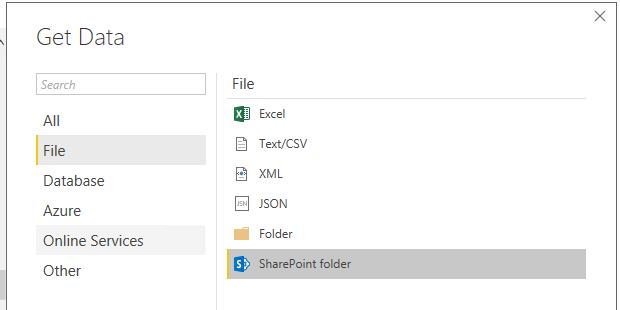
The SharePoint online list data source is used for retrieving SharePoint list data. Please use SharePoint Folder data source and try again:
Best Regards,
Qiuyun Yu
Thanks for the reply. My topic is incorrect. I was using the Sharepoint Folder connection. There are multiple spreadsheets there and when I select the one I want it returns this error.
Failed to save modifications to the server. Error returned: 'The provider 'Microsoft.PowerBI.OleDb' is not registered.....
If you have recently started exploring Fabric, we'd love to hear how it's going. Your feedback can help with product improvements.
A new Power BI DataViz World Championship is coming this June! Don't miss out on submitting your entry.
Share feedback directly with Fabric product managers, participate in targeted research studies and influence the Fabric roadmap.
| User | Count |
|---|---|
| 2 | |
| 2 | |
| 1 | |
| 1 | |
| 1 |
| User | Count |
|---|---|
| 2 | |
| 2 | |
| 2 | |
| 2 | |
| 2 |