Share feedback directly with Fabric product managers, participate in targeted research studies and influence the Fabric roadmap.
Sign up nowGet Fabric certified for FREE! Don't miss your chance! Learn more
I'm using the new Power BI Report Server October 2017. Trying to use a Sharepoint Online *.xlsm data file as a data source. I can get logged in and connected but when I try to load the spreadsheet I get an error as follows:
Failed to save modifications to the server. Error returned: 'The provider Microsoft.PowerBI.OleDb' is not registered. The following system error occurred: Class not registered A connection could not be made to the data source with the Name of......
Hi @larryortega,
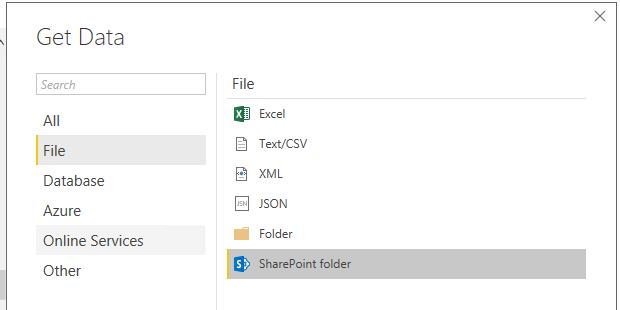
The SharePoint online list data source is used for retrieving SharePoint list data. Please use SharePoint Folder data source and try again:
Best Regards,
Qiuyun Yu
Thanks for the reply. My topic is incorrect. I was using the Sharepoint Folder connection. There are multiple spreadsheets there and when I select the one I want it returns this error.
Failed to save modifications to the server. Error returned: 'The provider 'Microsoft.PowerBI.OleDb' is not registered.....
If you love stickers, then you will definitely want to check out our Community Sticker Challenge!
Check out the January 2026 Power BI update to learn about new features.
| User | Count |
|---|---|
| 3 | |
| 3 | |
| 1 | |
| 1 | |
| 1 |
| User | Count |
|---|---|
| 8 | |
| 5 | |
| 4 | |
| 3 | |
| 3 |