cancel
Showing results for 
Search instead for 
Did you mean: 

Try your skills in the Power BI Dataviz World Championship! Round one ends June 26. Join now

Reply
Anonymous
Not applicable

Schedule refresh doesn't update data for csv data source file

I create pbix file with a csv data source file which is located in network share folder.

Then I upload it to Power BI report server and create a schedule refresh plan.

Then I change the data in my csv file.

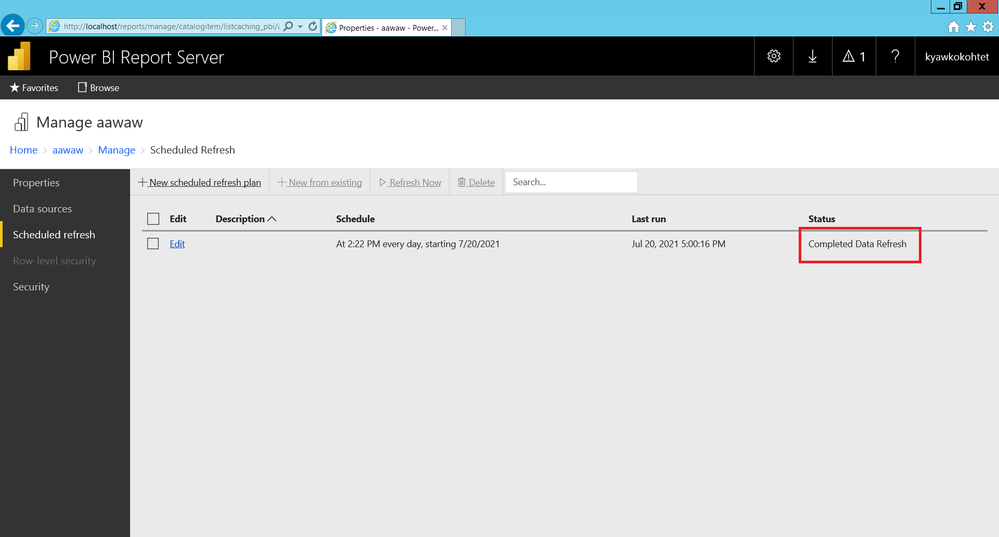
Although the refresh is completed, when I download and check pbix file, the data doesn't update.update error.png

1 ACCEPTED SOLUTION
FarhanAhmed
Community Champion
Community Champion

Once you upload file it saves it original contents of your files including data. and whenever you try to download it will download the last snapshot that is being uploaded in PBIRS.


Since you are refreshing the new file, the data will only be updated in Server Model and you will see that updated data in the report. But if you will download the PBIX file, the new content will not be download and you will see the last uploaded PBIX file.


Did I answer your question? Mark my post as a solution! Appreciate your Kudos!!

Proud to be a Super User!


View solution in original post

4 REPLIES 4
FarhanAhmed
Community Champion
Community Champion

Once you upload file it saves it original contents of your files including data. and whenever you try to download it will download the last snapshot that is being uploaded in PBIRS.


Since you are refreshing the new file, the data will only be updated in Server Model and you will see that updated data in the report. But if you will download the PBIX file, the new content will not be download and you will see the last uploaded PBIX file.


Did I answer your question? Mark my post as a solution! Appreciate your Kudos!!

Proud to be a Super User!


Anonymous
Not applicable

so is there any way to download the latest pbix file from server?

Unfortunately, there is no way that you can download the PBIX with the latest data which is refreshed from Scheduled Refresh. You will always get the latest snapshot that is uploaded for that PBIX file.


Did I answer your question? Mark my post as a solution! Appreciate your Kudos!!

Proud to be a Super User!


v-deddai1-msft
Community Support
Community Support

Hi @Anonymous ,


Would you please try to clear browser cache and refresh the report to see if the data have been changed?


If this post helps, then please consider Accept it as the solution to help the other members find it more quickly.


Best Regards,

Dedmon Dai

Helpful resources

Announcements
Fabric Data Days is here Carousel

Fabric Data Days 2026

Don't miss out on Data Days, June 15 through August 7. Learn Fabric, Power BI, SQL, AI and more.

Power BI DataViz World Championships carousel

Power BI DataViz World Championships - June 2026

A new Power BI DataViz World Championship is coming this June! Don't miss out on submitting your entry.