cancel
Showing results for 
Search instead for 
Did you mean: 

Next up in the FabCon + SQLCon recap series: The roadmap for Microsoft SQL and Maximizing Developer experiences in Fabric. All sessions are available on-demand after the live show. Register now

Reply

SSAS Live connection - Current Data

Hello, I am new to the analysis service and I have question about live connection.

I am using Power BI SSAS Live connection but every time data is updated in the data warehouse, analysis service needs to be processed (deployed) to load the updated date. as far as I know, analysis service is just a data structure and it is not saving information, thus it must always show actual data without the need to refresh, process or deploying. 

can someone advise me on how to fix this issue? I want to see live data without SSAS database need to be processed.

1 ACCEPTED SOLUTION
d_gosbell
Super User
Super User


@giorgi_lommidd wrote:

I am using Power BI SSAS Live connection but every time data is updated in the data warehouse, analysis service needs to be processed (deployed) to load the updated date. 


So processing and deployment are technically two separate operations (although the default configuration in Visual Studio does both together). Deployment is the operation that uploads the model strucuture to the server (similar to doing "CREATE TABLE" in SQL). Processing is the operation that loads that structure with data (similar to doing "INSERT" statements in SQL)


 as far as I know, analysis service is just a data structure and it is not saving information, thus it must always show actual data without the need to refresh, process or deploying. 


SSAS models can be created in 2 different modes. Import mode which does store a copy of the data or Direct Query mode which does not store any data, instead it generates SQL queries against a relational data source.


Are you saying that your model is in direct query mode or are you unsure?

View solution in original post

3 REPLIES 3
RoshnaShrestha
New Member

Hi ,

I use SSAS Live connection Power BI and im not able to set default date . Can you please help me how to set default date.?


Thanks Roshna

d_gosbell
Super User
Super User


@giorgi_lommidd wrote:

I am using Power BI SSAS Live connection but every time data is updated in the data warehouse, analysis service needs to be processed (deployed) to load the updated date. 


So processing and deployment are technically two separate operations (although the default configuration in Visual Studio does both together). Deployment is the operation that uploads the model strucuture to the server (similar to doing "CREATE TABLE" in SQL). Processing is the operation that loads that structure with data (similar to doing "INSERT" statements in SQL)


 as far as I know, analysis service is just a data structure and it is not saving information, thus it must always show actual data without the need to refresh, process or deploying. 


SSAS models can be created in 2 different modes. Import mode which does store a copy of the data or Direct Query mode which does not store any data, instead it generates SQL queries against a relational data source.


Are you saying that your model is in direct query mode or are you unsure?

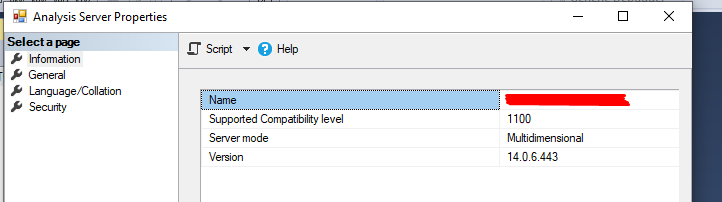
I am Using import mode. I have backed up SSAS DB to another computer, where SQL DB wasn't transferred and I could connect with "live connection" and with "import" modes of power bi to that SSAS DB model (cube) and could see values. this means SSAS is in Import mode right?

How can I change it to a live mode? The "supported Compatibility level" is 1100. 

Screenshot_1.png

Helpful resources

Announcements
New to Fabric survey Carousel

New to Fabric Survey

If you have recently started exploring Fabric, we'd love to hear how it's going. Your feedback can help with product improvements.

Power BI DataViz World Championships carousel

Power BI DataViz World Championships - June 2026

A new Power BI DataViz World Championship is coming this June! Don't miss out on submitting your entry.

Join our Fabric User Panel

Join our Fabric User Panel

Share feedback directly with Fabric product managers, participate in targeted research studies and influence the Fabric roadmap.

March Power BI Update Carousel

Power BI Community Update - March 2026

Check out the March 2026 Power BI update to learn about new features.