Get certified for free when you join Fabric Data Days 2026 and dive into Fabric, Power BI, SQL, AI, and other essential data skills.
Join nowJuly 7 - July 17 | Round 2 of the Power BI Dataviz World Championships. Don't miss your chance! Learn more
I create reports with live data (Direct Query) connect them to the Power BI Report Server, on many of my reports I use CTE’s in my query, Power BI lets me retrieve data into the Power Query Editor which looks great and next moment I click on ‘Close and Apply’ which is supposed to load the dataset on Power BI Desktop I get an error message.
Work-around using an Import query is not an option because reports need live data. I’ve observed this issue is on-going for some years now, needs a fix as soon as possible, as all the reports created are for the Report Server.
Are there any suggestions to work with CTEs and Direct Query?
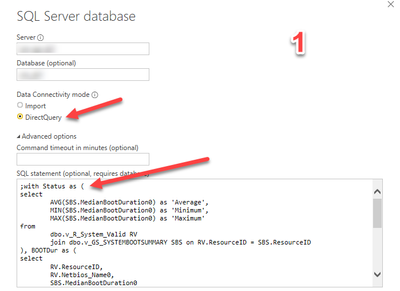
The Query uses CTE’s with Direct Query
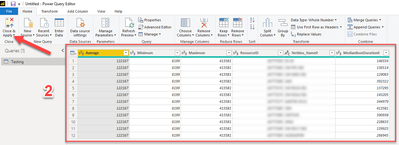
data retrieved successfully into Power Query Editor,
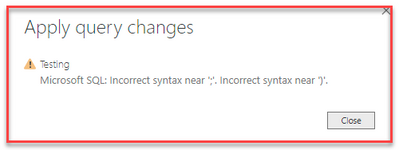
This is the error message I receive on the Power BI Desktop workspace. No further details to this message.
@Anonymous
why dont you create a view in your origin SQL DB?
I see there are a lot of issues with CTE in Direct Query mode, like
https://community.powerbi.com/t5/Desktop/Custom-query-with-CTE-not-supported-bug/td-p/41395
also, please, vote for idea here
https://ideas.powerbi.com/ideas/idea/?ideaid=c0f672db-981d-45f2-982d-36bbf39b16f6
Microsoft does not allow the SCCM DB to be edited,
Join us in Barcelona for FabCon and SQLCon, the Fabric, Power BI, SQL, and AI community event. Save €200 with code FABCMTY200.
Join Data Days 2026: 60 days of free live/on-demand sessions, challenges, study groups, and certification opportunities.
| User | Count |
|---|---|
| 3 | |
| 2 | |
| 1 | |
| 1 | |
| 1 |
| User | Count |
|---|---|
| 5 | |
| 2 | |
| 1 | |
| 1 | |
| 1 |