Join us at FabCon Atlanta from March 16 - 20, 2026, for the ultimate Fabric, Power BI, AI and SQL community-led event. Save $200 with code FABCOMM.
Register now!Vote for your favorite vizzies from the Power BI Dataviz World Championship submissions. Vote now!
HI,
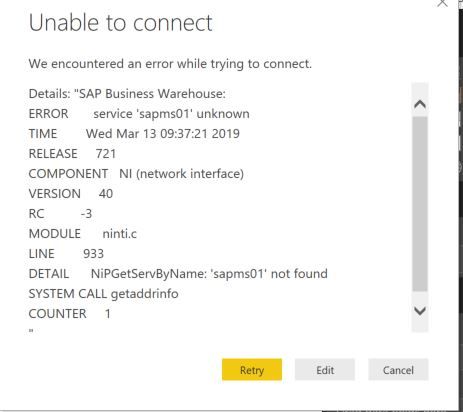
We are trying to use SAP Connector 3.0 to link PowerBI with our BW system.
But throwing the below message. Any idea on this?
Hi,
We have a similar situation. Now as a quick solution the sapms<SID> messageserverPort/tcp needs to be added to the services file, but we have quite many users using the powerbi desktop and we cannot tell each user to maintain this entry, is there any other way to over come this ?
Regards
Hi JackiePan,
I think it requires a new entry in the services file located at C:\Windows\System32\Drivers\etc
It normally has the following form:
sapms<SID> <port of message server>/tcp
<port of message server> is per standard 36<instance number>
E. g. if the SID of your SAP system is "PBG" and instance number is 10, the following entry needs to be added:
sapmsPBG 3610/tcp
Best regards,
Philipp
Hello,
I have a similar problem :
Details: "SAP Business Warehouse:
ERROR service 'sapmsPBG' unknown
TIME Tue Jun 11 11:18:07 2019
RELEASE 721
COMPONENT NI (network interface)
VERSION 40
RC -3
MODULE ninti.c
LINE 933
DETAIL NiPGetServByName: 'sapmsPBG' not found
SYSTEM CALL getaddrinfo
COUNTER 1
Can someone help ?
Vote for your favorite vizzies from the Power BI World Championship submissions!
If you love stickers, then you will definitely want to check out our Community Sticker Challenge!
Check out the January 2026 Power BI update to learn about new features.
| User | Count |
|---|---|
| 3 | |
| 3 | |
| 1 | |
| 1 | |
| 1 |
| User | Count |
|---|---|
| 6 | |
| 4 | |
| 4 | |
| 3 | |
| 2 |