cancel
Showing results for 
Search instead for 
Did you mean: 

Next up in the FabCon + SQLCon recap series: The roadmap for Microsoft SQL and Maximizing Developer experiences in Fabric. All sessions are available on-demand after the live show. Register now

Reply
Hassib
New Member

Power Bi Report server,

Dears, i am facing a huge issue that i can't find any solution to. 

i currently have PBi downloaded and configured

the problem i'm facing is that whenever i type in the URL to access the report server web portal, or even when i access it from the configuration window directly, i get the page loading continuously without it opening.

it just keeps on loading

How can i solve this?

Thank you!

1 ACCEPTED SOLUTION
v-luwang-msft
Community Support
Community Support

Hi @Hassib ,

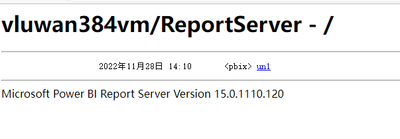
What do I get when I click on the link to the web service URL of the reporting server (like this: http://vluwan384vm/ReportServer)? Are there any errors reported? Also did you click on apply. And have you test other browers?

vluwangmsft_0-1669886180299.png


And you could refer the following article ,I first configure report server is according this article:

https://spgeeks.devoworx.com/install-and-configure-power-bi-report-server/ 


Best Regards

Lucien

View solution in original post

5 REPLIES 5
v-luwang-msft
Community Support
Community Support

Hi @Hassib ,

What do I get when I click on the link to the web service URL of the reporting server (like this: http://vluwan384vm/ReportServer)? Are there any errors reported? Also did you click on apply. And have you test other browers?

vluwangmsft_0-1669886180299.png


And you could refer the following article ,I first configure report server is according this article:

https://spgeeks.devoworx.com/install-and-configure-power-bi-report-server/ 


Best Regards

Lucien

God it finally worked thank you so much. 

All i had to do was try another browser.

i was trying to open it through chrome, kept on loading, and then when you suggested another browser i tried microsoft edge and VOILA! 

Thank you !

Hassib
New Member

Still no response from the server, still loading.

Shahfaisal
Solution Sage
Solution Sage

It is normal for the report server portal to take time to load when accessing it first time after a long period of inactivity. I would just give it time to load and see if it errors out. If it loads, you will find that it should render/load quickly after that.

Thank you i will wait it out and update the answer.

Helpful resources

Announcements
New to Fabric survey Carousel

New to Fabric Survey

If you have recently started exploring Fabric, we'd love to hear how it's going. Your feedback can help with product improvements.

Power BI DataViz World Championships carousel

Power BI DataViz World Championships - June 2026

A new Power BI DataViz World Championship is coming this June! Don't miss out on submitting your entry.

Join our Fabric User Panel

Join our Fabric User Panel

Share feedback directly with Fabric product managers, participate in targeted research studies and influence the Fabric roadmap.

March Power BI Update Carousel

Power BI Community Update - March 2026

Check out the March 2026 Power BI update to learn about new features.