cancel
Showing results for 
Search instead for 
Did you mean: 

Learn from the best! Meet the four finalists headed to the FINALS of the Power BI Dataviz World Championships! Register now

Reply
ehab23
Regular Visitor

Power Bi Report Server Session Time-out

Hi All ,


i successfully installed the power bi report server (march 2018) and everything for now is working good  , except for one thing


the Session time-out for the logged in user . since the uploaded dashboards are showing sensitive data.


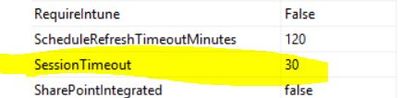
i looked into the Report server Database and walk through the tables until i found the Configurations table that the portal is reading from  ,and there is a row indicating the Session time out property (picture below) the default is 600s i changed it to 30s


but i didn't catch the difference !!!!!!!!!!!


any solutions ????


Capture.JPG

2 REPLIES 2
Buddy_C
Frequent Visitor

I have the same issue. I change the authentication mode from WindowsNTML to Froms. And I embeded a PowerBI Report to other web portal. But the session always shows timeout, even if I changed the database data: editsessiontimeout to 7200


Anonymous
Not applicable

i am having the same issue,

i use azure function app to embbed my reports, can't find anywhere a way to change the defulte session duriation....


did you manage to solved that?

Helpful resources

Announcements
Join our Fabric User Panel

Join our Fabric User Panel

Share feedback directly with Fabric product managers, participate in targeted research studies and influence the Fabric roadmap.

February Power BI Update Carousel

Power BI Monthly Update - February 2026

Check out the February 2026 Power BI update to learn about new features.

FabCon Atlanta 2026 carousel

FabCon Atlanta 2026

Join us at FabCon Atlanta, March 16-20, for the ultimate Fabric, Power BI, AI and SQL community-led event. Save $200 with code FABCOMM.