Join us at FabCon Atlanta from March 16 - 20, 2026, for the ultimate Fabric, Power BI, AI and SQL community-led event. Save $200 with code FABCOMM.
Register now!Learn from the best! Meet the four finalists headed to the FINALS of the Power BI Dataviz World Championships! Register now
Hello. I have question.
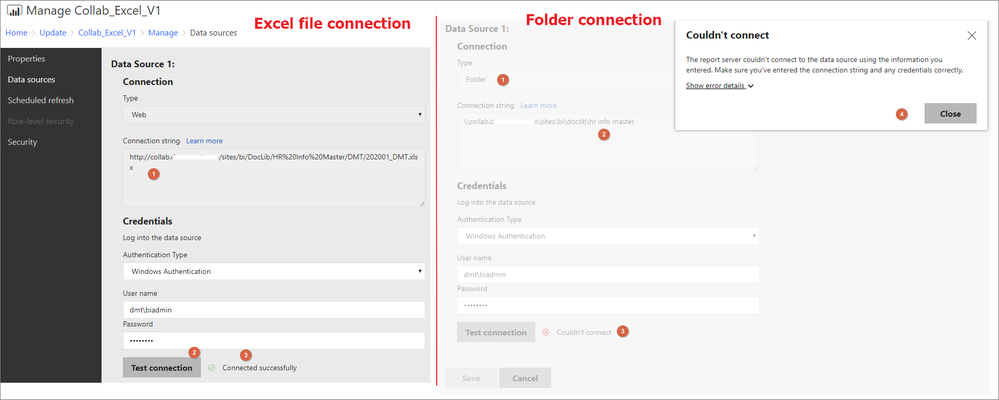
As picture below. I am getting two data from sharepoint.
The first is the excel table in the sharepoit, the other one is sharepoint folder.
In the power point desktop, I could connect and get data.
But, when setting a data source setting in power bi report server,
excel file data source is conneted successfully, but sharepoint folder could not connect.
What should I have to check?
You could check the Issues forum here:
https://community.powerbi.com/t5/Issues/idb-p/Issues
And if it is not there, then you could post it.
If you have Pro account you could try to open a support ticket. If you have a Pro account it is free. Go to https://support.powerbi.com. Scroll down and click "CREATE SUPPORT TICKET".
Share feedback directly with Fabric product managers, participate in targeted research studies and influence the Fabric roadmap.
Check out the February 2026 Power BI update to learn about new features.
| User | Count |
|---|---|
| 2 | |
| 2 | |
| 1 | |
| 1 | |
| 1 |
| User | Count |
|---|---|
| 6 | |
| 5 | |
| 4 | |
| 3 | |
| 3 |