This is best Fabric, Power BI, SQL and AI community event. How do we know? The last event sold out! Save €200 with code FABCMTY200.
Register nowA new Data Days event is coming soon! This time we’re going bigger than ever. Fabric, Power BI, SQL, AI and more. Don't miss out.
Hi Folks,
I recently installed Power BI Server (Trial Edition) on my laptop on Win 10 Pro with SQL Server Developer Edition and I could publish from "Power BI Desktop (Oct 17) for Report Server" or Upload directly from the Power BI Report Server interface a PBIX file larger than 100Mb.
However when I try to perform the same functionality on the Development Server running 'Power BI Report Server - Developer Edition' on Windows 2012 Server with SQL Server Developer Edition I get the following error "This file is too large to be uploaded. Files larger than 100 MB are not currently supported."
When I try to publish from the "Power BI Desktop (Oct 17) for Report Server" to my Dev Server I get the following error "Can't Open File or Folder /. It may have been moved, renamed or deleted". I have admin access on the Dev - Power BI Report Server and permission to publish to the folder I am trying to.
I have tried to search for a solution for these error messages but can't find a clear solution. Can someone with knowledge about this or previous expeirence please help to resolve it?
Thank you
Hi @rajiv_tarafdar,
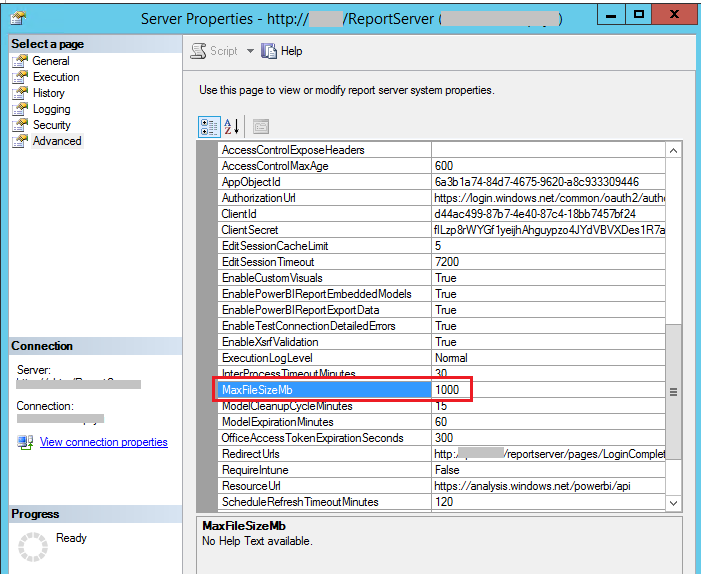
With the latest Power BI report server version 14.0.600.442, default file size limit is 1 GB, and wen can increase it further to 2 GB.
In your scenario, please make sure you are running the latest version. Also connect to Power BI report server instance in SSMS and right click to open server properties, check which value set for the MaxFileSizeMb (Default is now 1000).
Best Regards,
Qiuyun Yu
Checked all of the settings on SSRS. The Limit is high enough to allow the file
I am also running the Oct 17 version of PBRS.
Check out the May 2026 Power BI update to learn about new features.
Sign up to receive a private message when registration opens and key events begin.
If you have recently started exploring Fabric, we'd love to hear how it's going. Your feedback can help with product improvements.
| User | Count |
|---|---|
| 2 | |
| 2 | |
| 2 | |
| 2 | |
| 2 |