This time we’re going bigger than ever. Fabric, Power BI, SQL, AI and more. We're covering it all. You won't want to miss it.
Learn moreLevel up your Power BI skills this month - build one visual each week and tell better stories with data! Get started
Hello @d_gosbell ,
I'm currently trying to connect Power BI Desktop (for Report Server) with SQL Server to connect to a data source.
IT has provided me the Server details, SQL Statement, and Connection String to input here in Power BI.
Once I input the required details here (Server, database, also added a SQL Statement in advanced options).
Next, I input the required database user and password.
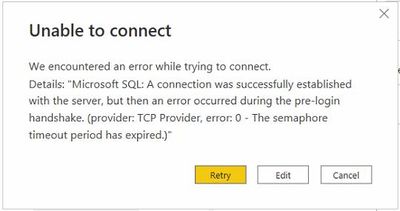
The IT dept has connected the ports to ensure connection is established to the SQL Server. However, after that this error comes up. Kindly assist on how to fix this error.
Thanks in advance! Appreciate the support.
Hi,
Are you able to connect through SQL Server Management Studio (SSMS) with the same information? Added the reference link for your scenario to check - https://stackoverflow.com/questions/3270199/a-connection-was-successfully-established-with-the-serve...
Thanks
Hari
Check out the April 2026 Power BI update to learn about new features.
Sign up to receive a private message when registration opens and key events begin.
If you have recently started exploring Fabric, we'd love to hear how it's going. Your feedback can help with product improvements.
| User | Count |
|---|---|
| 3 | |
| 2 | |
| 2 | |
| 2 | |
| 1 |