cancel
Showing results for 
Search instead for 
Did you mean: 

The Power BI Data Visualization World Championships is back! Get ahead of the game and start preparing now! Learn more

Reply
BenH
New Member

Pagination filters - All Values results in a blank report

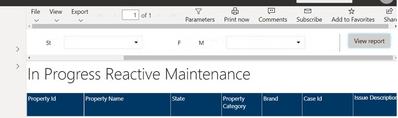
I have a pagination report connected to my data set that reports on work orders. There are 3 filter options and if I select "All Values" the result is blank as per below:

BenH_0-1637628872648.png


If I select one value with each filter, than I get a report with expect sub set of results.


Is there a way to have "all values" work in the paramater settings for a report? 


2 REPLIES 2
AbhiSSRS
Solution Sage
Solution Sage

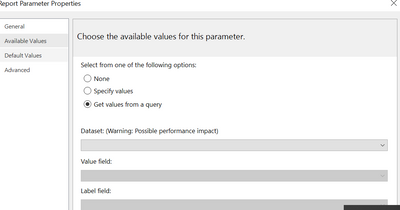
You may have to do a workaround with making your paramter multiselct and add both default value and avaialble values to populate from a dataset . First create datasets that have the values you populate in your parameters for each parameter. Then bind those to these datasets on Available values and also default values. Then when you run your report, it will run by default and have "Select all" selected in dropdowns.


AbhiSSRS_0-1638960989644.png


d_gosbell
Super User
Super User

This will normally work by default if you've used the Query Designer to build your query or if you've constructed your query to handle multi-valued parameters. Can you paste a copy of your query so we can see how you are using the parameters?

Helpful resources

Announcements
Power BI DataViz World Championships

Power BI Dataviz World Championships

The Power BI Data Visualization World Championships is back! Get ahead of the game and start preparing now!

November Power BI Update Carousel

Power BI Monthly Update - November 2025

Check out the November 2025 Power BI update to learn about new features.

FabCon Atlanta 2026 carousel

FabCon Atlanta 2026

Join us at FabCon Atlanta, March 16-20, for the ultimate Fabric, Power BI, AI and SQL community-led event. Save $200 with code FABCOMM.