cancel
Showing results for 
Search instead for 
Did you mean: 

The Power BI Data Visualization World Championships is back! Get ahead of the game and start preparing now! Learn more

Reply
jimsweb
Regular Visitor

Onpremise direct query surprise

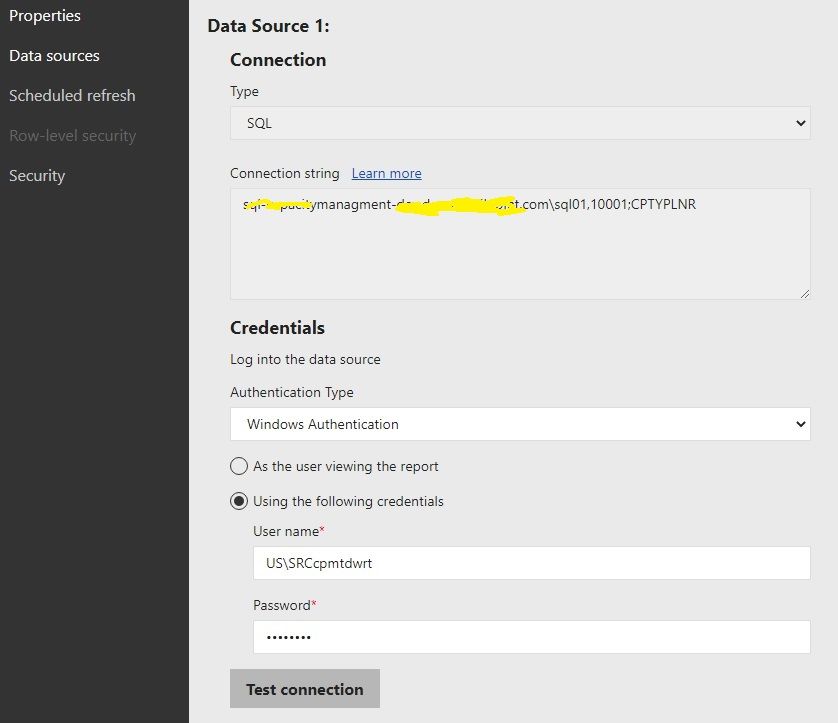
I'm tryng to make the onpremise direct query work for mySQL / maria DB. I have successfully set up a deployed SQL server direct query report to reporting server. It just works fine and I could see the connection string if i click on the manage tab in reporting server.  As you can see below, the data source is enabled and visible at the righ pane. All looks good for SQL server.

Untitled.jpg

Now coming to Maria DB /SQL server. To my surprise, the direct query using maria DB works just fine in desktop, but it doesnt work on pn-premise server. After teh deployment, if I come to manage tab, the data source tab is grayed out.. Why PBI behaves differently for mariadb whereas it just works fine for SQL server? Maria DB screen print below. 

Untitled.jpg


1 ACCEPTED SOLUTION
Icey
Community Support
Community Support

Hi @jimsweb ,


Please check if using CData ODBC Driver for MariaDB could work in your scenario:

View Reports on Real-Time MariaDB Data in Power BI Report Server (cdata.com).


Best Regards,

Icey


If this post helps, then please consider Accept it as the solution to help the other members find it more quickly.

View solution in original post

3 REPLIES 3
freginier
Super User
Super User

Do you have the same issue if you import data from maria ? 

How do publish your report in Report Server ? 

hello, yes, i do have the same issue if i import the data.  I just figured out a way to overcome this issue.. Just use ODBC connection instead of the direct connectivity from PBI. obviously, PBI doesnt play nice with opensource databases.. 😉

Icey
Community Support
Community Support

Hi @jimsweb ,


Please check if using CData ODBC Driver for MariaDB could work in your scenario:

View Reports on Real-Time MariaDB Data in Power BI Report Server (cdata.com).


Best Regards,

Icey


If this post helps, then please consider Accept it as the solution to help the other members find it more quickly.

Helpful resources

Announcements
Power BI DataViz World Championships

Power BI Dataviz World Championships

The Power BI Data Visualization World Championships is back! Get ahead of the game and start preparing now!

December 2025 Power BI Update Carousel

Power BI Monthly Update - December 2025

Check out the December 2025 Power BI Holiday Recap!

FabCon Atlanta 2026 carousel

FabCon Atlanta 2026

Join us at FabCon Atlanta, March 16-20, for the ultimate Fabric, Power BI, AI and SQL community-led event. Save $200 with code FABCOMM.

Top Solution Authors