cancel
Showing results for 
Search instead for 
Did you mean: 

Next up in the FabCon + SQLCon recap series: The roadmap for Microsoft SQL and Maximizing Developer experiences in Fabric. All sessions are available on-demand after the live show. Register now

Reply
Anandhu12
Frequent Visitor

Not able to Upload csv file into Power BI to create Dataflow

In premium license I was trying to upload a csv file to create a dataflow to perform AutoML,when I click browse button and after choosing the csv file, I was not able to upload the CSV file.No errors were shown but a warning.

Do I need to enable any option on the admin portal to upload the csv file?


power.png


2 REPLIES 2
Anonymous
Not applicable

Common issues with importing a CSV (and the work-arounds to fix them) The most common CSV import errors include: The file size is too large - The CSV import tool of the program you're using might have a file size requirement. To reduce the file size, you can delete unnecessary data values, columns, and rows.


This may help you,

Rachel Gomez

Anonymous
Not applicable

Hi @Anandhu12 ,

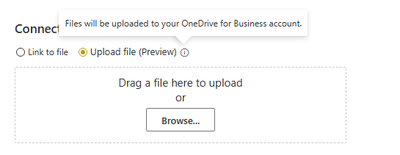
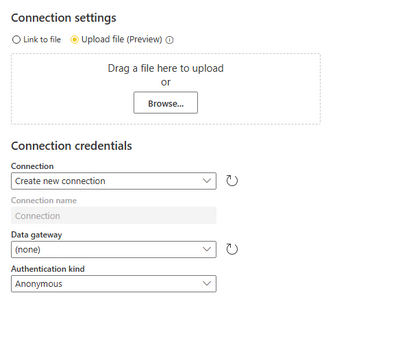
Because when you choose upload file to create a dataflow, the file will be uploaded to your OneDrive for Business or SharePoint Online, please confirm the account have the license for SharePoint Online or OneDrive for Business. You could choose the authentication kinds.

vbinbinyumsft_0-1672624680727.png

vbinbinyumsft_1-1672624974634.png

Best regards,
Community Support Team_Binbin Yu
If this post helps, then please consider Accept it as the solution to help the other members find it more quickly.

Helpful resources

Announcements
New to Fabric survey Carousel

New to Fabric Survey

If you have recently started exploring Fabric, we'd love to hear how it's going. Your feedback can help with product improvements.

Power BI DataViz World Championships carousel

Power BI DataViz World Championships - June 2026

A new Power BI DataViz World Championship is coming this June! Don't miss out on submitting your entry.

Join our Fabric User Panel

Join our Fabric User Panel

Share feedback directly with Fabric product managers, participate in targeted research studies and influence the Fabric roadmap.

March Power BI Update Carousel

Power BI Community Update - March 2026

Check out the March 2026 Power BI update to learn about new features.