Hi!
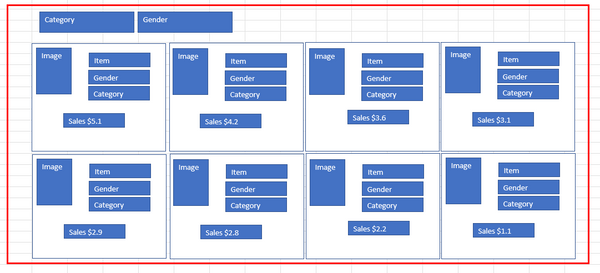
I looking to make a paginated report to show a free form box with a variety of data in it, and then to have multiple columns across the page. I have seen you can do a multicolumn report, where you set the report to have 4 columns. Except with the multicolumn report, I can't see how to sort across the page and then down. It sorts my items down the page then across.
The other method I saw was to create identical tablixes across the page and in each of them have a row visibility formula = =IIF((RowNumber(Nothing) Mod 4) = 1, False, True) ect. and that seems to work with sorting across then down.
The next challenge comes when I want to do page breaks and sorting. I want the report to group by Category and then Gender and within each group sort by Sales $ across the page then down. I also want the category and gender to show on the top of each page for the page break.
The only way I could figure out how to get a title to change with each page break was to wrap my tablixes in a list (the red box). I was able to get the titles to change each time there is a page break except it doesn't stay if there are 2 pages in the same grouping. Then my sort wasn't working. My second grouping started sorting with the 4th column being the highest value, not sure why that is happening.
What is the best route to do this? if I have to use the 4 tablixes wrapped in a list, what part do I put the sort and grouping on, the list or the tablix's? The group properties or tablix properties?
Any help would be appreciated.