Join us at FabCon Atlanta from March 16 - 20, 2026, for the ultimate Fabric, Power BI, AI and SQL community-led event. Save $200 with code FABCOMM.
Register now!Get Fabric Certified for FREE during Fabric Data Days. Don't miss your chance! Request now
Hi Everyone,
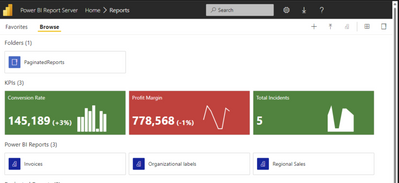
What I wanted to know is how can I publish report on Power BI Report Server as shown below:
But since I am using Power BI Desktop version - 2.121.762.0 64-bit (September 2023) I am unable to save nor share report to Power BI report Server.
Furthermore, I tried to use Power BI Desktop version 2.117.984.0 64-bit (May 2023) but since it does not support some of the preview features such as shape map etc that are required for my project I am not able to solve this by switching to that version.
Are there any workarounds that I could implement using Power BI Desktop version - 2.121.762.0 64-bit (September 2023) ? or do I have to use different Power BI Desktop version with different workaround?
If anyone can help me with this it would be much appreciated.
You are using the wrong version of Desktop. This blog post explains the issue and possible fixes Power BI Report Server – fixing “Can’t upload this report” – Random Procrastination (gosbell.com)
Check out the November 2025 Power BI update to learn about new features.
Advance your Data & AI career with 50 days of live learning, contests, hands-on challenges, study groups & certifications and more!
| User | Count |
|---|---|
| 7 | |
| 2 | |
| 2 | |
| 2 | |
| 1 |
| User | Count |
|---|---|
| 13 | |
| 5 | |
| 3 | |
| 3 | |
| 2 |