Join us at FabCon Atlanta from March 16 - 20, 2026, for the ultimate Fabric, Power BI, AI and SQL community-led event. Save $200 with code FABCOMM.
Register now!Vote for your favorite vizzies from the Power BI Dataviz World Championship submissions. Vote now!
Hi all,
I am using OData. I knew that we could only set the schedule refresh daily or 8 times per day.
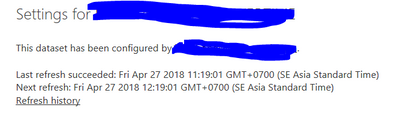
But I accidentally met the situation in the picture below. I tested and I really worked hourly.
I want to apply it for all of mine available dataset but I couldn't. Does anyone know please help me?
Thank you
Solved! Go to Solution.
Are you using the on-premise Report Server? If so there are no limits on the scheduled refresh - you can refresh every 5 minutes if you want.
I think the restrictions only apply to the Power BI Service in Azure.
Please can you expand on your comment: "I want to apply it for all of mine available dataset but I couldn't.".
Are you using the on-premise Report Server? If so there are no limits on the scheduled refresh - you can refresh every 5 minutes if you want.
I think the restrictions only apply to the Power BI Service in Azure.
Please can you expand on your comment: "I want to apply it for all of mine available dataset but I couldn't.".
If you love stickers, then you will definitely want to check out our Community Sticker Challenge!
Check out the January 2026 Power BI update to learn about new features.
| User | Count |
|---|---|
| 3 | |
| 2 | |
| 1 | |
| 1 | |
| 1 |
| User | Count |
|---|---|
| 6 | |
| 4 | |
| 3 | |
| 3 | |
| 2 |