cancel
Showing results for 
Search instead for 
Did you mean: 

Learn from the best! Meet the four finalists headed to the FINALS of the Power BI Dataviz World Championships! Register now

Reply
Anonymous
Not applicable

Hourly refresh

Hi all,


I am using OData. I knew that we could only set the schedule refresh daily or 8 times per day.


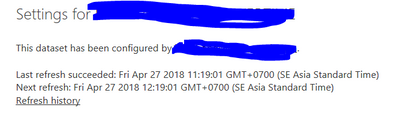
But I accidentally met the situation in the picture below. I tested and I really worked hourly.


I want to apply it for all of mine available dataset but I couldn't. Does anyone know please help me?


Thank you

Capture.PNG

1 ACCEPTED SOLUTION
Anonymous
Not applicable

Are you using the on-premise Report Server? If so there are no limits on the scheduled refresh - you can refresh every 5 minutes if you want.


I think the restrictions only apply to the Power BI Service in Azure.


Please can you expand on your comment: "I want to apply it for all of mine available dataset but I couldn't.".

View solution in original post

1 REPLY 1
Anonymous
Not applicable

Are you using the on-premise Report Server? If so there are no limits on the scheduled refresh - you can refresh every 5 minutes if you want.


I think the restrictions only apply to the Power BI Service in Azure.


Please can you expand on your comment: "I want to apply it for all of mine available dataset but I couldn't.".

Helpful resources

Announcements
Join our Fabric User Panel

Join our Fabric User Panel

Share feedback directly with Fabric product managers, participate in targeted research studies and influence the Fabric roadmap.

February Power BI Update Carousel

Power BI Monthly Update - February 2026

Check out the February 2026 Power BI update to learn about new features.

FabCon Atlanta 2026 carousel

FabCon Atlanta 2026

Join us at FabCon Atlanta, March 16-20, for the ultimate Fabric, Power BI, AI and SQL community-led event. Save $200 with code FABCOMM.