cancel
Showing results for 
Search instead for 
Did you mean: 

July 7 - July 17 | Round 2 of the Power BI Dataviz World Championships. Don't miss your chance! Learn more

Reply
MarkCam
Frequent Visitor

Hourly Refresh Stop Time

Good day


Please can someone assist, i have a Dashboard that refreshes every 30min and i set the start time at 08:00 AM, how do i get the Dashboard to stop refreshing at 23:00 PM and then only start again at 08:00 AM?


Thanks

MarkCam

1 ACCEPTED SOLUTION
Anonymous
Not applicable

Hi @MarkCam ,


I would like to know what kind of license you are using?
Currently the Power BI Pro license supports 8 refreshes per day and Power BI Premium supports 48 refreshes per day.


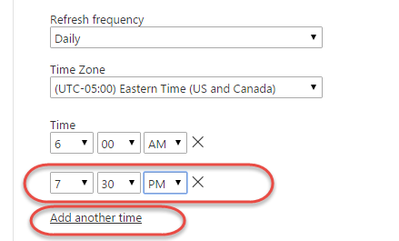
The way to enable refreshes more granularly than daily is by explicitly adding the times for the refresh using the “Add another time” link.

vcaitlynmstf_0-1654492540855.png


At this stage, it is not possible to implement your needs directly in Power BI through an option. It may seem complicated but it is a viable workaround.


Hope it helps,


Best Regards,
Community Support Team _ Caitlyn

If this post helps then please consider Accept it as the solution to help the other members find it more quickly.

View solution in original post

2 REPLIES 2
MarkCam
Frequent Visitor

Hi Caitlyn


That is exactly what i did, had to setup multiple refreshed to end it at a certain time. think it will be nice to add a end time to the hourly schedule.


Thank you for for the advise


Kind Regards

Mark


Anonymous
Not applicable

Hi @MarkCam ,


I would like to know what kind of license you are using?
Currently the Power BI Pro license supports 8 refreshes per day and Power BI Premium supports 48 refreshes per day.


The way to enable refreshes more granularly than daily is by explicitly adding the times for the refresh using the “Add another time” link.

vcaitlynmstf_0-1654492540855.png


At this stage, it is not possible to implement your needs directly in Power BI through an option. It may seem complicated but it is a viable workaround.


Hope it helps,


Best Regards,
Community Support Team _ Caitlyn

If this post helps then please consider Accept it as the solution to help the other members find it more quickly.

Helpful resources

Announcements
Fabric Data Days is here Carousel

Data Days 2026

Don't miss out on Data Days, June 15 through August 7. Learn Fabric, Power BI, SQL, AI and more.

Power BI DataViz World Championships carousel

Power BI DataViz World Championships - June 2026

A new Power BI DataViz World Championship is coming this June! Don't miss out on submitting your entry.