This is best Fabric, Power BI, SQL and AI community event. How do we know? The last event sold out! Save €200 with code FABCMTY200.
Register nowJuly 28 - August 9 | Final Round of the Power BI Dataviz World Championships. This is your chance. Learn more
Hello All,
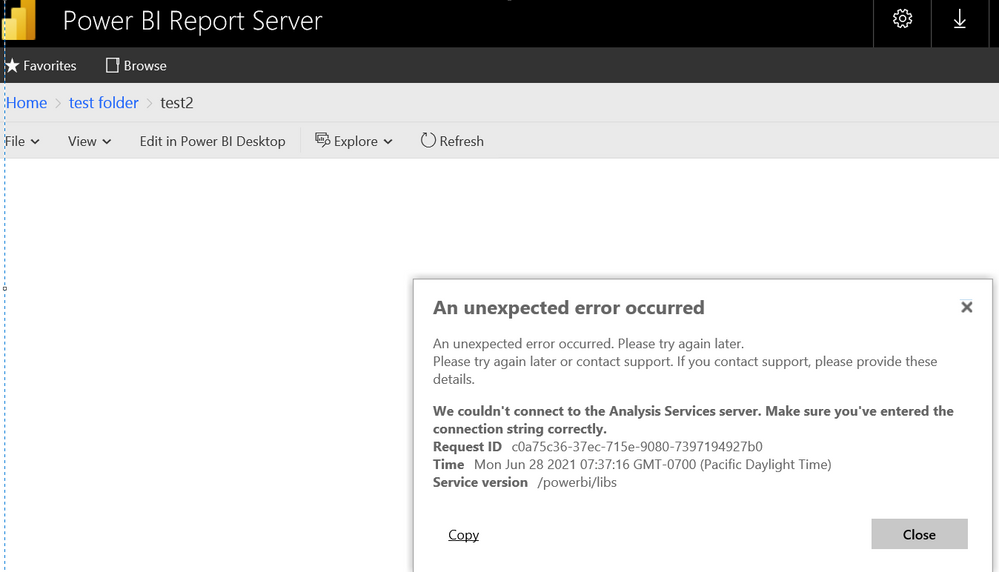
We're trying to connect to 'Oracle' data source connection through 'Direct Query mode' and it's working as expected on Power BI desktop application, but when we publish this report to Power BI report server ( On premise ) , we're getting the below shown error.
Note : We've validated the data source connection on power bi report server and the connection is successful, but we're seeing this error.
And current, we're using Power BI Report server May'2021 version and PBI desktop May'2021 version. We saw the same issue on earlier version ( i.e. January 2021 ) also .
Could you please look into this issue and kindly let us know your suggestions to fix it.
Thanks in advance !
- Gopi
@Anonymous
Have you tried the default Oracle database connector using Direct Query mode.
Connect to an Oracle database with Power BI Desktop - Power BI | Microsoft Docs
Paul Zheng _ Community Support Team
Hi @Anonymous ,
Thanks so much for looking on this issue, actually Oracle data base direct query mode is working on power bi desktop, but the problem we're facing is in power bi report server ( on premise ) - we can test the data source connection successfully on power bi report server, but when we run the report, it's throwing the below error. We're not able to fix this error, please help us on this.
Thanks in adavance !
Have you installed and tested the oracle drivers on your report server and gateway (if you have one?)
Hi @pabeader,
Thanks for checking on this, yes, we had already installed the oracle drivers and tested on our PBI report server, but we don't use/have gateway (server).
FYI - Here, ' import mode ' type and ODBC connection type is working fine, only the issue is with 'direct query' mode.
When we test the connection of the report on PBI report server - it's working fine, but when we run the report it's throwing error.
Any suggestions please to fix this.
Thank you !
I'm just getting ready to try direct query on oracle. If I run into trouble and figure it out, I will for sure post about it.
Join us in Barcelona for FabCon and SQLCon, the Fabric, Power BI, SQL, and AI community event. Save €200 with code FABCMTY200.
If you love stickers, then you will definitely want to check out our community sticker challenge, Barcelona edition!
Check out the July 2026 Power BI update to learn about new features.