cancel
Showing results for 
Search instead for 
Did you mean: 

The Fabric community is now in read-only for platform upgrade. Learn more

Reply
katrina890
Frequent Visitor

Gateway Data Source Setting - Advanced setting - Privacy Setting

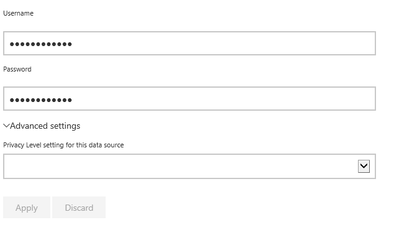
The Privacy Level Settings within the Advanced settings option is not saving. This is within all 6 on my data sources.

Power BI Privact setting.pngI have recreated all 6 data sources, with a Privacy setting - but the option keeps being removed.


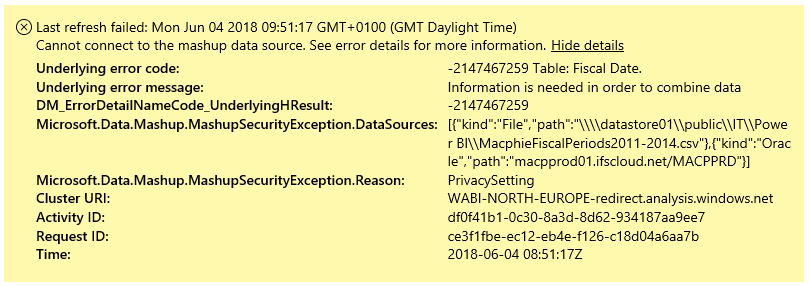
This is causing an issue when trying to refresh the data. Shown below.

Power BI Schedule error.png


1 ACCEPTED SOLUTION
katrina890
Frequent Visitor

It turns out this was all due to the security levels not matching of being the correct option.


Once all datasets were set to Public - the refresh started working as it should.


Thanks


View solution in original post

2 REPLIES 2
katrina890
Frequent Visitor

It turns out this was all due to the security levels not matching of being the correct option.


Once all datasets were set to Public - the refresh started working as it should.


Thanks


Conarl_on_BI
Helper III
Helper III

@katrina890

What release of the gateway do you have installed? And are your datasources associated to a gateway?

Are you using SSO for access the data? 

There is a setting in May release that resolve mashup error but if you can provide me the answer to the above question I may be able to help you.

Helpful resources

Announcements
FabCon and SQLCon Barcelona 2026

FabCon & SQLCon – Barcelona 2026

Join us in Barcelona for FabCon and SQLCon, the Fabric, Power BI, SQL, and AI community event. Save €200 with code FABCMTY200.

Power BI DataViz World Championships carousel

Power BI DataViz World Championships - June 2026

A new Power BI DataViz World Championship is coming this June! Don't miss out on submitting your entry.