cancel
Showing results for 
Search instead for 
Did you mean: 

Data Days is here! Join us now for 60+ days of learning, challenges, and connection. Learn more

Reply
katrina890
Frequent Visitor

Gateway Data Source Setting - Advanced setting - Privacy Setting

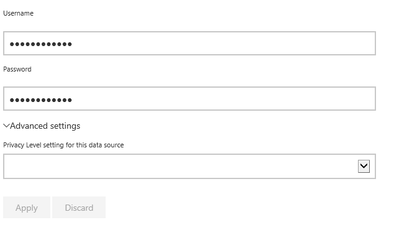
The Privacy Level Settings within the Advanced settings option is not saving. This is within all 6 on my data sources.

Power BI Privact setting.pngI have recreated all 6 data sources, with a Privacy setting - but the option keeps being removed.


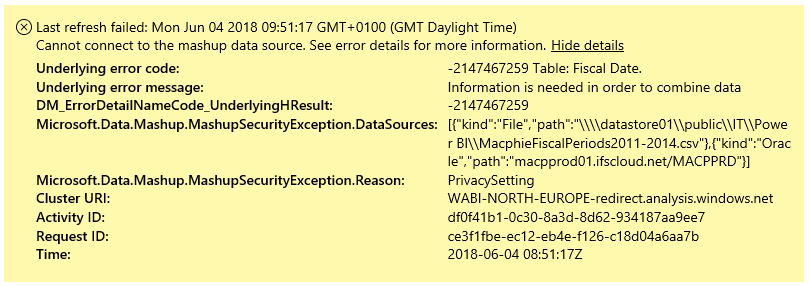
This is causing an issue when trying to refresh the data. Shown below.

Power BI Schedule error.png


1 ACCEPTED SOLUTION
katrina890
Frequent Visitor

It turns out this was all due to the security levels not matching of being the correct option.


Once all datasets were set to Public - the refresh started working as it should.


Thanks


View solution in original post

2 REPLIES 2
katrina890
Frequent Visitor

It turns out this was all due to the security levels not matching of being the correct option.


Once all datasets were set to Public - the refresh started working as it should.


Thanks


Conarl_on_BI
Helper III
Helper III

@katrina890

What release of the gateway do you have installed? And are your datasources associated to a gateway?

Are you using SSO for access the data? 

There is a setting in May release that resolve mashup error but if you can provide me the answer to the above question I may be able to help you.

Helpful resources

Announcements
Fabric Data Days is here Carousel

Fabric Data Days 2026

Don't miss out on Data Days, June 15 through August 7. Learn Fabric, Power BI, SQL, AI and more.

May Power BI Update Carousel

Power BI Monthly Update - May 2026

Check out the May 2026 Power BI update to learn about new features.

Power BI DataViz World Championships carousel

Power BI DataViz World Championships - June 2026

A new Power BI DataViz World Championship is coming this June! Don't miss out on submitting your entry.