cancel
Showing results for 
Search instead for 
Did you mean: 

Next up in the FabCon + SQLCon recap series: The roadmap for Microsoft SQL and Maximizing Developer experiences in Fabric. All sessions are available on-demand after the live show. Register now

Reply
mjsystemss
Resolver I
Resolver I

Formatting Text Boxes in Reporting Server


Hello,

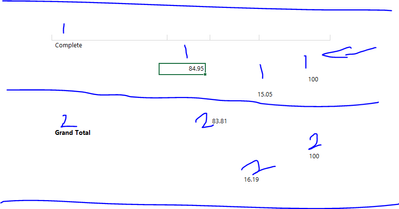
I need help with formatting text Boxes. It looks fine when I run the report but when I export to excel it scatters.

I want those numbers labelled 1 to align and those labelled 2 to align. I will appreciate any help

mjsystemss_0-1702052370476.png


1 ACCEPTED SOLUTION
d_gosbell
Super User
Super User

One option is to use a table to layout your cells, then everything should export to Excel OK.


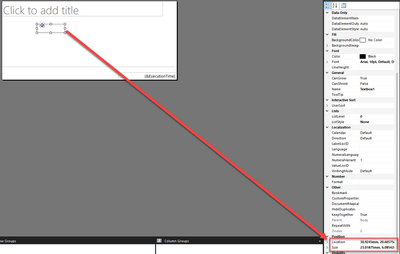
The other option is to manually edit the location and sizes in the properties. For all the "1" to be aligned vertically the "Top" position and the height need to be EXACTLY the same. If there is a difference of 0.001mm the excel render will put the data in different rows. The same goes with the horizonal alignment between the "1" and "2" items. You need to make sure the Left and width properties are the same if you want them aligned.

d_gosbell_0-1702254034367.png


View solution in original post

3 REPLIES 3
d_gosbell
Super User
Super User

One option is to use a table to layout your cells, then everything should export to Excel OK.


The other option is to manually edit the location and sizes in the properties. For all the "1" to be aligned vertically the "Top" position and the height need to be EXACTLY the same. If there is a difference of 0.001mm the excel render will put the data in different rows. The same goes with the horizonal alignment between the "1" and "2" items. You need to make sure the Left and width properties are the same if you want them aligned.

d_gosbell_0-1702254034367.png


Option 1 is fantastic. I just add a row below and use expression to add the Gran Total. Also I use the add total tab to add total. Your advise is useful

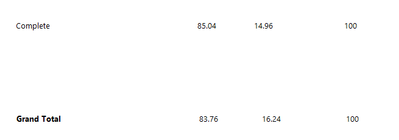
I have tried this using the text Box Option. I am able to get them on a line but their is space between the records. I need both records close to each other.

mjsystemss_1-1702316201738.png

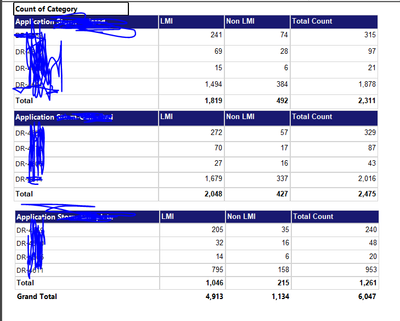
Also on the below, when I export the record to excel the size of the cells are a little big. I need them reduced.


mjsystemss_0-1702316156979.png


Helpful resources

Announcements
New to Fabric survey Carousel

New to Fabric Survey

If you have recently started exploring Fabric, we'd love to hear how it's going. Your feedback can help with product improvements.

Power BI DataViz World Championships carousel

Power BI DataViz World Championships - June 2026

A new Power BI DataViz World Championship is coming this June! Don't miss out on submitting your entry.

Join our Fabric User Panel

Join our Fabric User Panel

Share feedback directly with Fabric product managers, participate in targeted research studies and influence the Fabric roadmap.

March Power BI Update Carousel

Power BI Community Update - March 2026

Check out the March 2026 Power BI update to learn about new features.