Don't miss your chance to take the Fabric Data Engineer (DP-600) exam for FREE! Find out how by watching the DP-600 session on-demand now through April 28th.
Learn moreJoin the FabCon + SQLCon recap series. Up next: Power BI, Real-Time Intelligence, IQ and AI, and Data Factory take center stage. All sessions are available on-demand after the live show. Register now
Hi,
Is it possible to share reports externally which are published to an on-premise Power BI Server?
Thanks,
Vav
Hi, vavacious
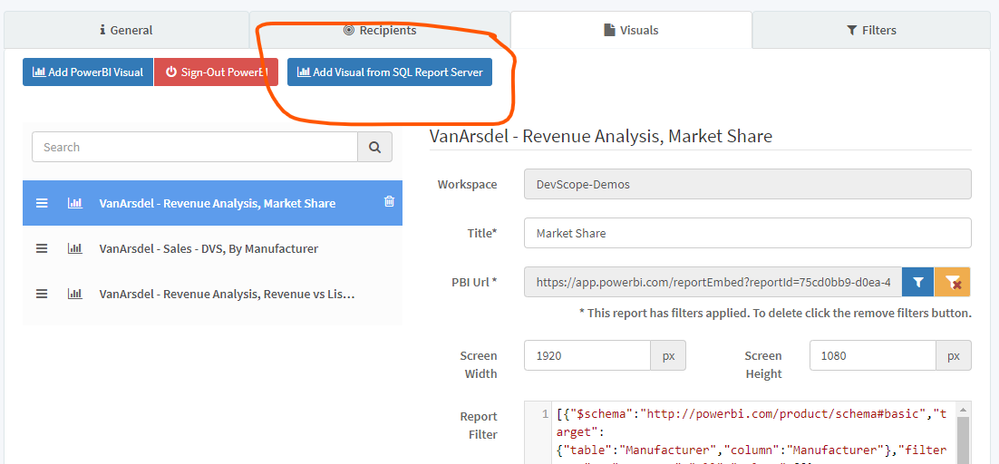
Power BI itself doesn't allow you to do this, but we developed a third-party app called PowerBI Robots that includes that function. You can download a free trial and give it a try. Since this is a very specific question, we don't have a tutorial for it, but you should login the web agent and inside your playlist navigate to the Visuals tab.
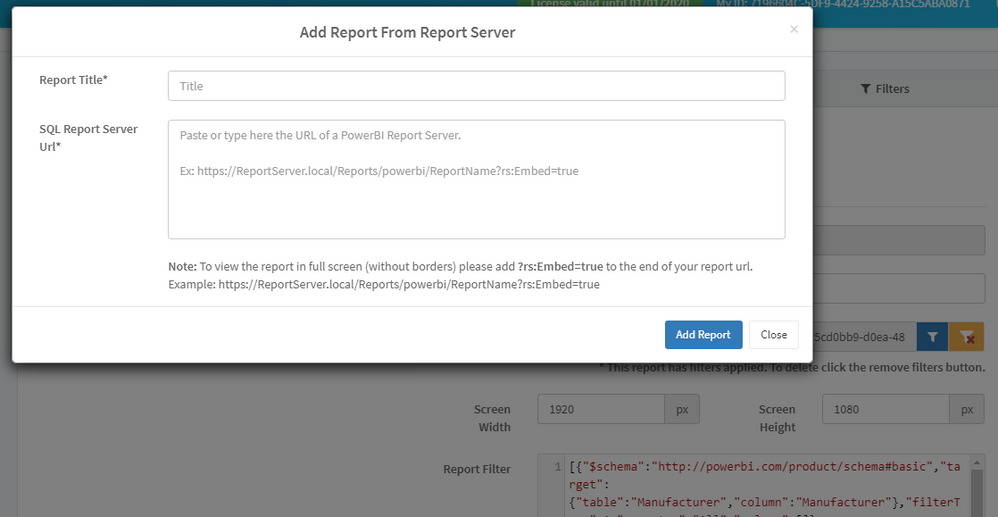
Click Add Visual from SQL Report Server and add your report's URL in the next screen:
If you have any questions or need any help using PowerBI Robots, please send us a message.
Best regards
Check out the April 2026 Power BI update to learn about new features.
If you have recently started exploring Fabric, we'd love to hear how it's going. Your feedback can help with product improvements.
A new Power BI DataViz World Championship is coming this June! Don't miss out on submitting your entry.
| User | Count |
|---|---|
| 3 | |
| 3 | |
| 2 | |
| 2 | |
| 2 |
| User | Count |
|---|---|
| 5 | |
| 3 | |
| 3 | |
| 3 | |
| 3 |