Don't miss your chance to take exam DP-600 or DP-700 on us!
Request nowLearn from the best! Meet the four finalists headed to the FINALS of the Power BI Dataviz World Championships! Register now
Hi All,
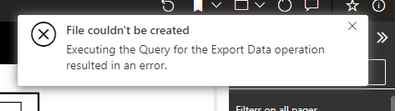
I take error when I try to excel export. Error is "File couldn't be created". How can I solve this error? Can you please support me?
Thank you.
Regards,
Sibel
Error Exporting to Excel
Go to 'Apps & Features' in Windows and find the Microsoft Office entry.
Select the entry and choose Modify.
Select the Quick Repair option, then click Repair. If Excel exporting still doesn't work, also try Online Repair.
Save any open unfinished work and restart the computer when convenient.
Regards,
Rachel Gomez
Hi @Anonymous ,
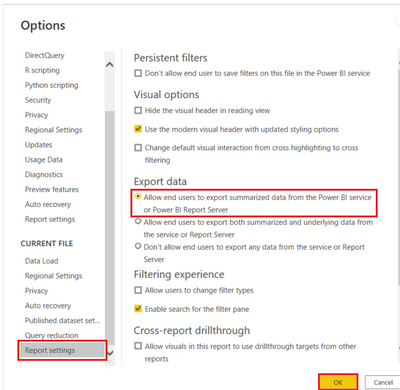
Please confirm that you set the export data correctly in Power BI Desktop for RS.
To set these options:
Start in Power BI Desktop.
From the upper left corner, select File > Options and Settings > Options.
Under CURRENT FILE, select Report settings
4. Make your selection from the Export data section
For more details, you can read related document: Export data from a Power BI visualization - Power BI | Microsoft Learn
Best regards,
Community Support Team_ Binbin Yu
If this post helps, then please consider Accept it as the solution to help the other members find it more quickly.
Share feedback directly with Fabric product managers, participate in targeted research studies and influence the Fabric roadmap.
Check out the February 2026 Power BI update to learn about new features.
| User | Count |
|---|---|
| 2 | |
| 2 | |
| 1 | |
| 1 | |
| 1 |
| User | Count |
|---|---|
| 6 | |
| 5 | |
| 4 | |
| 3 | |
| 2 |