cancel
Showing results for 
Search instead for 
Did you mean: 

Learn from the best! Meet the four finalists headed to the FINALS of the Power BI Dataviz World Championships! Register now

Reply
bengisby
Helper I
Helper I

Excel Data refresh fails

Hello,

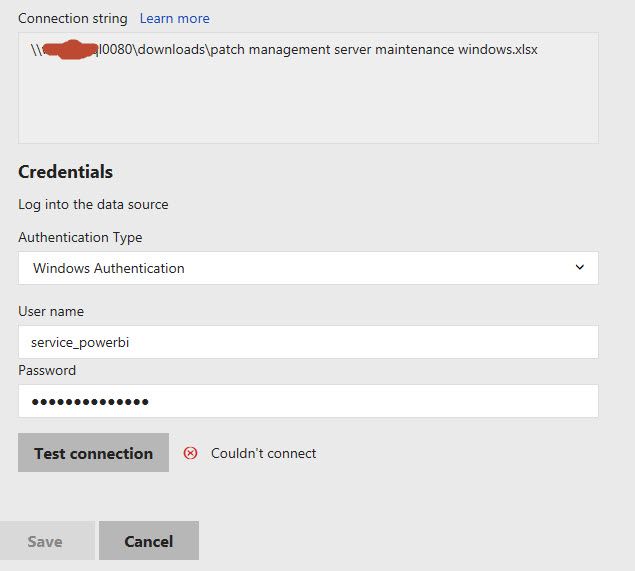
I have an on premisis server setup. I want to schedule a refresh of excel data. When setting up the data connection I can't get a successful test connection. Error is "Log on failed. Ensure the user name and password are correct." I even have the excel file right on the powerBI server and am using no driver letter in my path. I have verified the account credentials are correct.

I’ve given my "personal account", the "service_powerbi" account, and the "service_sqlserver" accounts all access to this share. I'm in an AD-controlled corporate environment. Any help is appreciated, thank you.


path.jpg

1 ACCEPTED SOLUTION
Martin_H
Regular Visitor

Edited:

Hi,


I also didn't understand which Windows user that one should use to connect to files on a network share (not local path) and got the same error message as bengisby. 


After reading https://docs.microsoft.com/en-us/power-bi/report-server/configure-scheduled-refresh I did however realise that I had missed to write the domain (is what it's called? I mean the equivalent of contoso\ on the link) and only the user name (john on the link). When I wrote both the domain and the user name it worked.


Best regards

Martin


View solution in original post

2 REPLIES 2
Martin_H
Regular Visitor

Edited:

Hi,


I also didn't understand which Windows user that one should use to connect to files on a network share (not local path) and got the same error message as bengisby. 


After reading https://docs.microsoft.com/en-us/power-bi/report-server/configure-scheduled-refresh I did however realise that I had missed to write the domain (is what it's called? I mean the equivalent of contoso\ on the link) and only the user name (john on the link). When I wrote both the domain and the user name it worked.


Best regards

Martin


v-yulgu-msft
Microsoft Employee
Microsoft Employee

Hi @bengisby,


In this document, it mentions that

"If a File or Folder data source is used and the file path is a local path (e.g. C:\Users\user\Documents), then a refresh plan cannot be created. The path must be a path the report server can connect to like a network share. For example, \myshare\Documents."


Regards,

Yuliana Gu

Community Support Team _ Yuliana Gu
If this post helps, then please consider Accept it as the solution to help the other members find it more quickly.

Helpful resources

Announcements
New to Fabric survey Carousel

New to Fabric Survey

If you have recently started exploring Fabric, we'd love to hear how it's going. Your feedback can help with product improvements.

Power BI DataViz World Championships carousel

Power BI DataViz World Championships - June 2026

A new Power BI DataViz World Championship is coming this June! Don't miss out on submitting your entry.

Join our Fabric User Panel

Join our Fabric User Panel

Share feedback directly with Fabric product managers, participate in targeted research studies and influence the Fabric roadmap.

March Power BI Update Carousel

Power BI Community Update - March 2026

Check out the March 2026 Power BI update to learn about new features.