cancel
Showing results for 
Search instead for 
Did you mean: 

The Power BI Data Visualization World Championships is back! Get ahead of the game and start preparing now! Learn more

Reply
Mart_Ief
New Member

Error using parameters in datasource with Direct Query in update May 2020

We're getting errors using parameters in the datasource together with Direct Query in the May 2020 update.

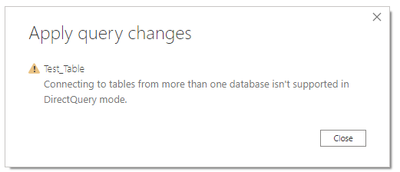
Even if we just connect to one SQL Server table with parameters for server and database, after we close and apply we get the error: 'Connecting to tables from more than one database is not supported with Direct Query'.

In the Power Query editor the table is shown correctly (also after refresh) and with hardcoded server and database everything works fine, as well as in import mode using parameters.


We've used parameters in the datasource substantially in production so we're hesitant to deploy the May 2020 update.


Anyone an idea?

Martin

5 REPLIES 5
bp88we
New Member

Hello,


same problem here ... not sure why Microsoft deploys a solution that is not downward compatible (guess that's just their customer friendly approach).


Anyway: any news on this yet?


(Or will I have to redesign all Power BI reports / start looking into alternative products?)


d_gosbell
Super User
Super User

@bradsy are you aware of any issues in this area of parameters and Direct Query?

bradsy
Microsoft Employee
Microsoft Employee

I have not heard any problems similar to this. If you can detail the repro a little better, we can give it a try to see if we can replicate the issue.

Thank you for responding.

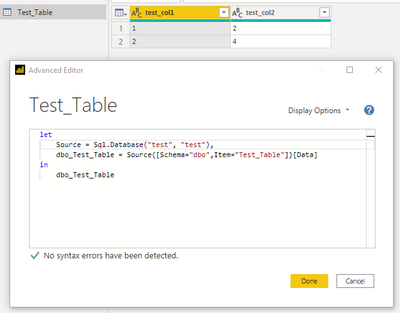
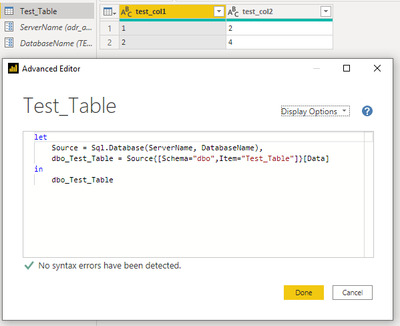
I'll illustrate with a few screenshots...all in DirectQuery mode:


First with hardcoded server and database

een.png

after close and apply the connection is evaluated correctly.

Then with parameters 'ServerName' and 'DatabaseName'

twee.png

after close and apply the next message appears during connection evaluation...

drie.png

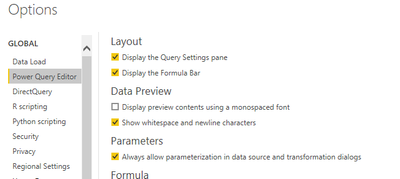
Allow parameterization in datasource is on.

vier.png

Up till now this worked fine and as I said used all over production.

gr.

Martin

bradsy
Microsoft Employee
Microsoft Employee

Hi Mart_lef,


I was not able to reproduce. The parameters were applied and my dataset kept working with DQ. Any other users seeing this?

Helpful resources

Announcements
Power BI DataViz World Championships

Power BI Dataviz World Championships

The Power BI Data Visualization World Championships is back! Get ahead of the game and start preparing now!

December 2025 Power BI Update Carousel

Power BI Monthly Update - December 2025

Check out the December 2025 Power BI Holiday Recap!

FabCon Atlanta 2026 carousel

FabCon Atlanta 2026

Join us at FabCon Atlanta, March 16-20, for the ultimate Fabric, Power BI, AI and SQL community-led event. Save $200 with code FABCOMM.