cancel
Showing results for 
Search instead for 
Did you mean: 

July 7 - July 17 | Round 2 of the Power BI Dataviz World Championships. Don't miss your chance! Learn more

Reply
Mart_Ief
New Member

Error using parameters in datasource with Direct Query in update May 2020

We're getting errors using parameters in the datasource together with Direct Query in the May 2020 update.

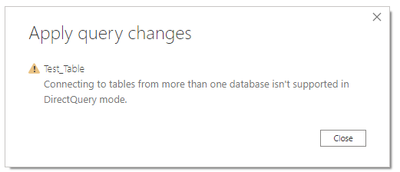
Even if we just connect to one SQL Server table with parameters for server and database, after we close and apply we get the error: 'Connecting to tables from more than one database is not supported with Direct Query'.

In the Power Query editor the table is shown correctly (also after refresh) and with hardcoded server and database everything works fine, as well as in import mode using parameters.


We've used parameters in the datasource substantially in production so we're hesitant to deploy the May 2020 update.


Anyone an idea?

Martin

5 REPLIES 5
bp88we
New Member

Hello,


same problem here ... not sure why Microsoft deploys a solution that is not downward compatible (guess that's just their customer friendly approach).


Anyway: any news on this yet?


(Or will I have to redesign all Power BI reports / start looking into alternative products?)


d_gosbell
Super User
Super User

@bradsy are you aware of any issues in this area of parameters and Direct Query?

bradsy
Microsoft Employee
Microsoft Employee

I have not heard any problems similar to this. If you can detail the repro a little better, we can give it a try to see if we can replicate the issue.

Thank you for responding.

I'll illustrate with a few screenshots...all in DirectQuery mode:


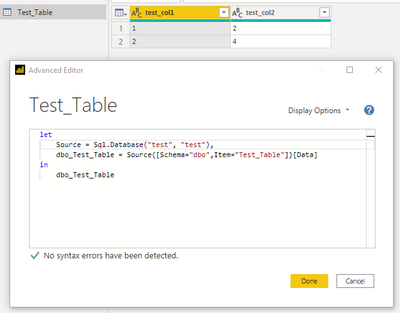
First with hardcoded server and database

een.png

after close and apply the connection is evaluated correctly.

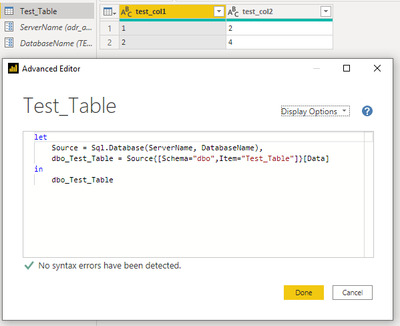
Then with parameters 'ServerName' and 'DatabaseName'

twee.png

after close and apply the next message appears during connection evaluation...

drie.png

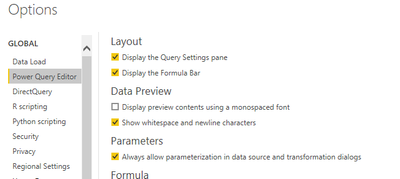
Allow parameterization in datasource is on.

vier.png

Up till now this worked fine and as I said used all over production.

gr.

Martin

bradsy
Microsoft Employee
Microsoft Employee

Hi Mart_lef,


I was not able to reproduce. The parameters were applied and my dataset kept working with DQ. Any other users seeing this?

Helpful resources

Announcements
FabCon and SQLCon Barcelona 2026

FabCon & SQLCon – Barcelona 2026

Join us in Barcelona for FabCon and SQLCon, the Fabric, Power BI, SQL, and AI community event. Save €200 with code FABCMTY200.

60 days of Data Days Carousel

Data Days 2026

Join Data Days 2026: 60 days of free live/on-demand sessions, challenges, study groups, and certification opportunities.

Power BI DataViz World Championships carousel

Power BI DataViz World Championships - June 2026

A new Power BI DataViz World Championship is coming this June! Don't miss out on submitting your entry.