cancel
Showing results for 
Search instead for 
Did you mean: 

Did you hear? There's a new SQL AI Developer certification (DP-800). Start preparing now and be one of the first to get certified. Register now

Reply
carolinejesus
New Member

Error on Incremental Update

Hi Guys!


I found one way to use incremental refresh using .xlsx files and I was able to do all the steps to cofigure it on PBI Desktop, but, when I went to service to update using the gateway I got this error:


Can someone, please, help me to understand this error?


Erro de fonte de dados: {"error":{"code":"DM_GWPipeline_Gateway_MashupDataAccessError","pbi.error":{"code":"DM_GWPipeline_Gateway_MashupDataAccessError","parameters":{},"details":[{"code":"DM_ErrorDetailNameCode_UnderlyingErrorCode","detail":{"type":1,"value":"-2147467259"}},{"code":"DM_ErrorDetailNameCode_UnderlyingErrorMessage","detail":{"type":1,"value":"A coluna 'Date' da tabela não foi encontrada."}},{"code":"DM_ErrorDetailNameCode_UnderlyingHResult","detail":{"type":1,"value":"-2147467259"}},{"code":"Microsoft.Data.Mashup.ValueError.Detail","detail":{"type":1,"value":"Date"}},{"code":"Microsoft.Data.Mashup.ValueError.Reason","detail":{"type":1,"value":"Expression.Error"}}],"exceptionCulprit":1}}}

1 ACCEPTED SOLUTION


@Anonymous wrote:

@carolinejesus  Hi there, we need to have Power BI premium license to have the Incremental refresh work.


This was originally the case but they changed this last year so that it was available to pro (see https://powerbi.microsoft.com/en-us/blog/incremental-refresh-is-generally-available/


Incremental refresh against Excel files only makes sense if you have a folder of Excel files and you are able to filter which files you open based on a date somehow. This is because Excel files do not have a query processing engine. The whole file has be transferred to Power BI and then decompressed and scanned in order to pull out part of the data and by the time you have done all that work it's just as easy and fast to load the whole file.


If you are loading multiple files then it sounds like one of your files or folders has a different structure. The error message is saying something about not finding a 'Date' column


View solution in original post

3 REPLIES 3
jedsh08
Frequent Visitor

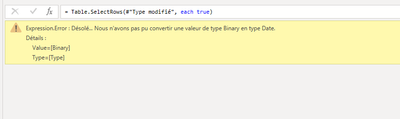
I have also a problem while doing incremental update process on Power BI Desktop. After creating in Power Query,  RangeStart and RangeEnd parameters i have errors on my tables.

jedsh08_0-1654784649514.png

Could you help me?


Anonymous
Not applicable

@carolinejesus  Hi there, we need to have Power BI premium license to have the Incremental refresh work.


Check license once.


Regards,
John Basha Mattipati,
https://www.linkedin.com/in/john-basha-mattipati-06812980/


@Anonymous wrote:

@carolinejesus  Hi there, we need to have Power BI premium license to have the Incremental refresh work.


This was originally the case but they changed this last year so that it was available to pro (see https://powerbi.microsoft.com/en-us/blog/incremental-refresh-is-generally-available/


Incremental refresh against Excel files only makes sense if you have a folder of Excel files and you are able to filter which files you open based on a date somehow. This is because Excel files do not have a query processing engine. The whole file has be transferred to Power BI and then decompressed and scanned in order to pull out part of the data and by the time you have done all that work it's just as easy and fast to load the whole file.


If you are loading multiple files then it sounds like one of your files or folders has a different structure. The error message is saying something about not finding a 'Date' column


Helpful resources

Announcements
April Power BI Update Carousel

Power BI Monthly Update - April 2026

Check out the April 2026 Power BI update to learn about new features.

Fabric SQL PBI Data Days

Data Days 2026 coming soon!

Sign up to receive a private message when registration opens and key events begin.

New to Fabric survey Carousel

New to Fabric Survey

If you have recently started exploring Fabric, we'd love to hear how it's going. Your feedback can help with product improvements.

Power BI DataViz World Championships carousel

Power BI DataViz World Championships - June 2026

A new Power BI DataViz World Championship is coming this June! Don't miss out on submitting your entry.