cancel
Showing results for 
Search instead for 
Did you mean: 

We've captured the moments from FabCon & SQLCon that everyone is talking about, and we are bringing them to the community, live and on-demand. Starts on April 14th. Register now

Reply
melwakil
Frequent Visitor

Embedded power Bi server reports into SharePoint

Is it Possible to embed reports from Power Bi report server into SharePoint to be seen by the users who already part of the damin and authorized to see the reports ? is the IFRAME could pass their cerdentials without the window popup that appeared from the iframe that asking the user to enter his credentials again .

Thanks

1 ACCEPTED SOLUTION
pbx
Helper V
Helper V

Yes it is. See here for details of how to embed various PBIRS reports to SharePoint.
https://whitepages.unlimitedviz.com/2017/09/sharepoint-and-the-new-ssrspbirs-native-mode-report-view...

However, the problem you are going to run into is those PBI reports will not render in IE because SharePoint by default serve pages in IE-10 compatibility mode and PBI only works with IE 11 and newer. You won't have that issue with Chrome though.

View solution in original post

6 REPLIES 6
v-yulgu-msft
Microsoft Employee
Microsoft Employee

Hi @melwakil,


To embed a PBI report from Power BI Report Server into SharePoint, you can append a querystring parameter of ?rs:Embed=true to report URL.


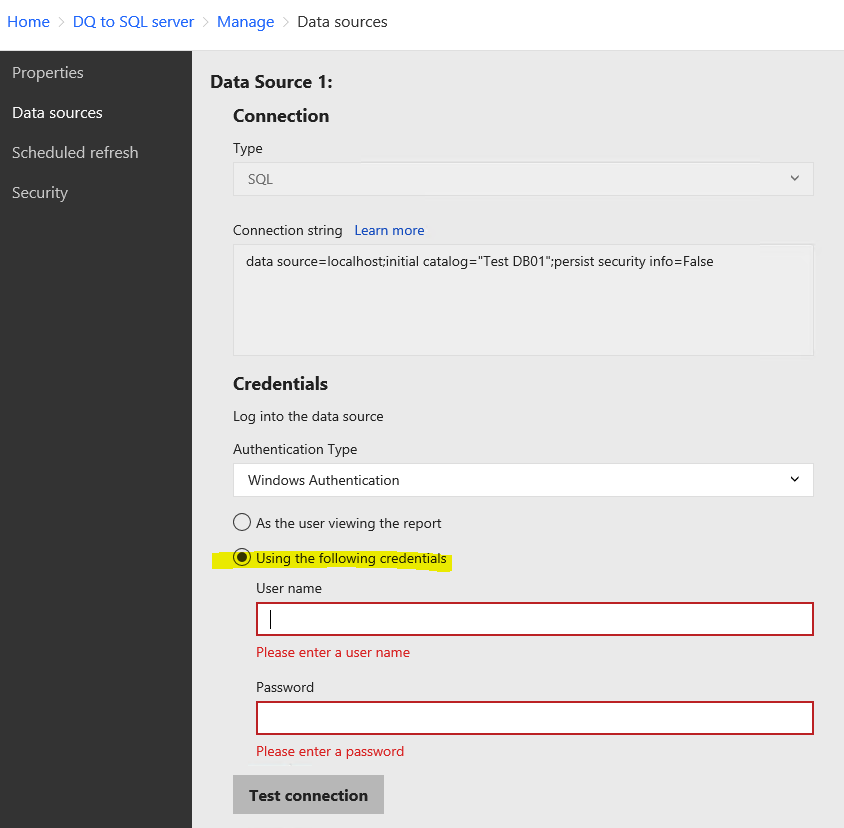
To avoid credential prompt, you could set "stored credential" under Data Sources tab.

1.PNG


Best regards,

Yuliana Gu


Community Support Team _ Yuliana Gu
If this post helps, then please consider Accept it as the solution to help the other members find it more quickly.

Thanks v-yulgu , but i think the credential prompt appeared because pbirs trying to authorized the user either the user have a permission to see the report or not. So saveing credentials in the data source will not avoid the windows prompt

Kerberos my friend, Kerberos is what you need.
melwakil
Frequent Visitor

Thanks pbx, Kerberos is used to delegate the user credentials between pbirs and the report data source in case the report and its data source are not in the same machine. I think it should be something in the web part inside sharePoint itself
pbx
Helper V
Helper V

Yes it is. See here for details of how to embed various PBIRS reports to SharePoint.
https://whitepages.unlimitedviz.com/2017/09/sharepoint-and-the-new-ssrspbirs-native-mode-report-view...

However, the problem you are going to run into is those PBI reports will not render in IE because SharePoint by default serve pages in IE-10 compatibility mode and PBI only works with IE 11 and newer. You won't have that issue with Chrome though.
melwakil
Frequent Visitor

Thanks pbx, I will try the new web part, and let you know the result

Helpful resources

Announcements
New to Fabric survey Carousel

New to Fabric Survey

If you have recently started exploring Fabric, we'd love to hear how it's going. Your feedback can help with product improvements.

Power BI DataViz World Championships carousel

Power BI DataViz World Championships - June 2026

A new Power BI DataViz World Championship is coming this June! Don't miss out on submitting your entry.

Join our Fabric User Panel

Join our Fabric User Panel

Share feedback directly with Fabric product managers, participate in targeted research studies and influence the Fabric roadmap.

March Power BI Update Carousel

Power BI Community Update - March 2026

Check out the March 2026 Power BI update to learn about new features.