Join us at FabCon Atlanta from March 16 - 20, 2026, for the ultimate Fabric, Power BI, AI and SQL community-led event. Save $200 with code FABCOMM.
Register now!The Power BI Data Visualization World Championships is back! Get ahead of the game and start preparing now! Learn more
Hi There,
My issue is very simple.
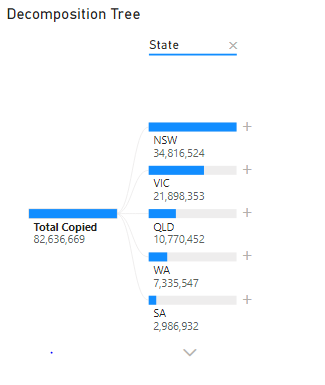
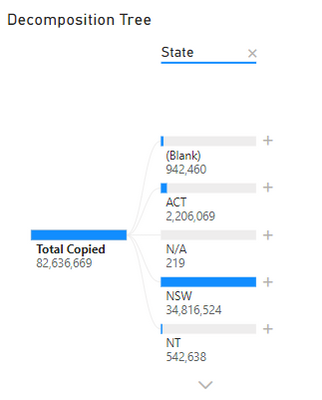
When I publish a report on PBI server, the sort applied to a decomposition tree (Descending by value) is not respected and instead it sorts descending alphabetically.
Desktop:
Server:
What I tried:
- Check a similar post on the community: https://community.powerbi.com/t5/Service/Decomposition-Tree-has-no-default-sort-on-my-online-report/... This does not apply to my issue as I do not want to sort the values on the dataset.
- Revert to default on the server. It doesn't work, the sort alphabetically is the default on the server
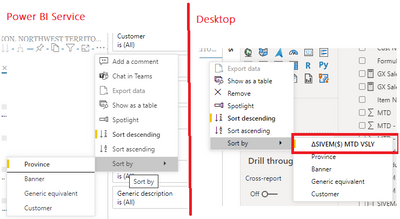
- Edit on the server and Sort but the only option is an Alphabetical sort:
Did anyone run into this issue before?
Regards,
Alex
Solved! Go to Solution.
Hi, everyone.
Update again:
The problem has been fixed and the sort number is working fine now.
Regards
Janey
Hi, @Anonymous
If I understand correctly, you created a report using the rs version of the desktop, and the decomposition tree above was not sorted by value after publishing to report server, right? What's your desktop version? Do you have any changes after publishing?
Best Regards
Janey Guo
Hi @v-janeyg-msft ,
Yes that's correct. I sorted the tree by values in desktop version 2.94.921.0 64-bit (June 2021).
When published into the server the tree loses the the sorting by values and is instead sorted by category (state alphabetical).
Regards,
Alex
I'm having the same problem, cannot sorting by value, only sorting by category in the portal (cannot choose analyze field to sort).
My Version: 2.94.921.0 64-bit (June 2021)
I'm having the same issue since a few days and I am also looking for a solution for that.
Same Version: Version: 2.94.921.0 64-bit (Juni 2021)
The Power BI Data Visualization World Championships is back! Get ahead of the game and start preparing now!