Join us at FabCon Atlanta from March 16 - 20, 2026, for the ultimate Fabric, Power BI, AI and SQL community-led event. Save $200 with code FABCOMM.
Register now!The Power BI Data Visualization World Championships is back! Get ahead of the game and start preparing now! Learn more
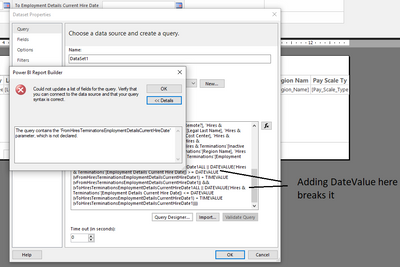
Hello, I am trying to add a date parameter but am receiving the following error
"Query (1, 148) DAX comparison operations do not support comparing values of type Date with values of type Text. Consider using the VALUE or FORMAT function to convert one of the values.
----------------------------
Query execution failed for dataset 'ToHiresTerminationsEmploymentDetailsCurrentHireDate'."
I have tried Format, Parse and DateValue as suggested in other threads but adding anything to the Query code breaks it
Any ideas on how to fix this?
Thanks,
Joe
Solved! Go to Solution.
Which datasource are you connecting to? Instead add datevalue() in the query formula. You might want to go the datasource then change the data type of the columns to a same comparable type (date type).
Paul Zheng _ Community Support Team
If this post helps, please Accept it as the solution to help the other members find it more quickly.
Which datasource are you connecting to? Instead add datevalue() in the query formula. You might want to go the datasource then change the data type of the columns to a same comparable type (date type).
Paul Zheng _ Community Support Team
If this post helps, please Accept it as the solution to help the other members find it more quickly.
The Power BI Data Visualization World Championships is back! Get ahead of the game and start preparing now!
| User | Count |
|---|---|
| 5 | |
| 3 | |
| 3 | |
| 3 | |
| 2 |
| User | Count |
|---|---|
| 10 | |
| 5 | |
| 5 | |
| 4 | |
| 3 |