cancel
Showing results for 
Search instead for 
Did you mean: 

July 7 - July 17 | Round 2 of the Power BI Dataviz World Championships. Don't miss your chance! Learn more

Reply
Anonymous
Not applicable

DNS_FAIL when using Report Server Configuration Manager

Hello everyone. 

I have been searching for someone with this problem, but "dns" casts no results in the search bar; hope someone can help.


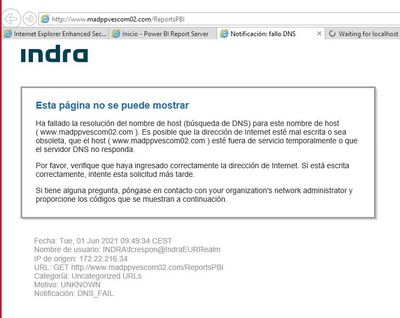
When using either of the URLs generated by the Report Server Configuration manager, I encounter the following error:
 

Asanchezreyes_0-1622535301661.jpeg


It is in Spanish (as you can see) but it reads (rough translation):

----------------------------------------

This website cannot be shown.


The host name resolution has failed (DNS search) for this host name (www.madppvescom02.com). It is possible that the Internet address is wrongly written of obsolete, that the host (www.madppvescom02.com) is temporary out of service o that the DNS server does not answer.


Please verify that you have correctly entered the Internet address. If it is correct, try this request later.


If you have any question, contact your organization's network administrator and give the codes that are follow:

-----------------------------

And then the details of the error.


I must specify that this comes from trying to use the sofware in a remote desktop, in case that matters.


Could anyone shed some light about this topic?


Many thanks in advance,

Alberto.


1 ACCEPTED SOLUTION
d_gosbell
Super User
Super User

The Report Server Configuration manager only controls the last part of the url - the "/ReportsPBI" part. The machine or DNS name, the www.madppvescom02.com part is configured by your IT department.


If you can remote desktop onto the server try connecting to http://localhost/reportsPBI this should work as long as you have not configured any host headers.


But to get remote connections working using www.madppvescom02.com you will need to talk to your IT admins to get them to fix the DNS issue. You cannot alter DNS settings from Report Server Configuration manager.

View solution in original post

2 REPLIES 2
d_gosbell
Super User
Super User

The Report Server Configuration manager only controls the last part of the url - the "/ReportsPBI" part. The machine or DNS name, the www.madppvescom02.com part is configured by your IT department.


If you can remote desktop onto the server try connecting to http://localhost/reportsPBI this should work as long as you have not configured any host headers.


But to get remote connections working using www.madppvescom02.com you will need to talk to your IT admins to get them to fix the DNS issue. You cannot alter DNS settings from Report Server Configuration manager.

HashamNiaz
Solution Sage
Solution Sage

Hi @Anonymous !


Try accessing the below URL from sever machine & then local laptop;


http://www.madppvescom02.com/Reports 


Also, make sure you have added the IP address for Web URL in PBI Report Server Configuration Manager, it seems like you are able to open ReportServer URL, you need to put IP address entries for both Web Portal URL & Web Service URL


PBI Configuration ManagerPBI Configuration Manager


Regards,

Hasham

Helpful resources

Announcements
FabCon and SQLCon Barcelona 2026

FabCon & SQLCon – Barcelona 2026

Join us in Barcelona for FabCon and SQLCon, the Fabric, Power BI, SQL, and AI community event. Save €200 with code FABCMTY200.

60 days of Data Days Carousel

Data Days 2026

Join Fabric Data Days 2026: 60 days of free live/on-demand sessions, challenges, study groups, and certification opportunities.

Power BI DataViz World Championships carousel

Power BI DataViz World Championships - June 2026

A new Power BI DataViz World Championship is coming this June! Don't miss out on submitting your entry.