cancel
Showing results for 
Search instead for 
Did you mean: 

The Power BI Data Visualization World Championships is back! Get ahead of the game and start preparing now! Learn more

Reply
Anonymous
Not applicable

Circular relationship

Hello,

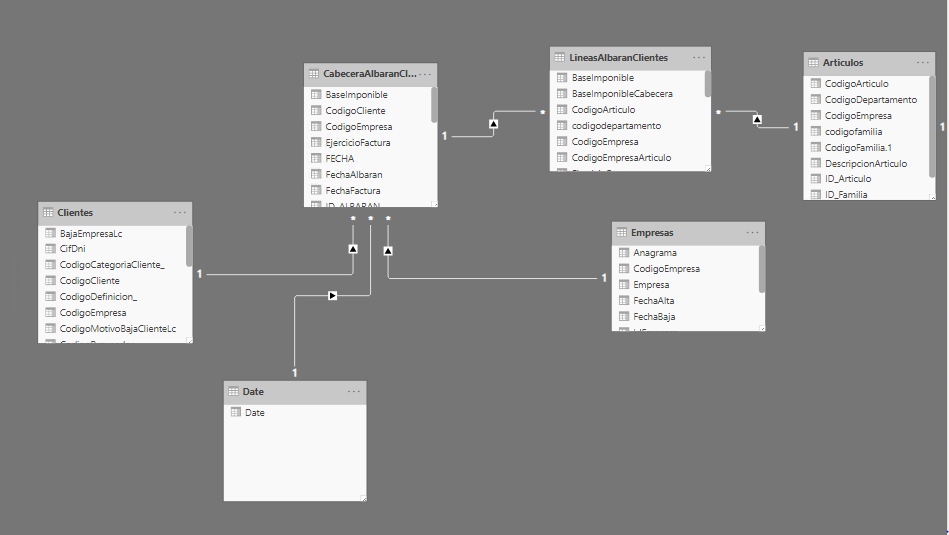
I´m creating a new Report and need to create a relationship between the Date and Customers tables to calculate de number of Customers whose registration date is equal to the selected date.


I can´t create this relationship because this causes a circular relationship.


Can you help me to solved this problem?CircularRelationship.PNG

1 ACCEPTED SOLUTION

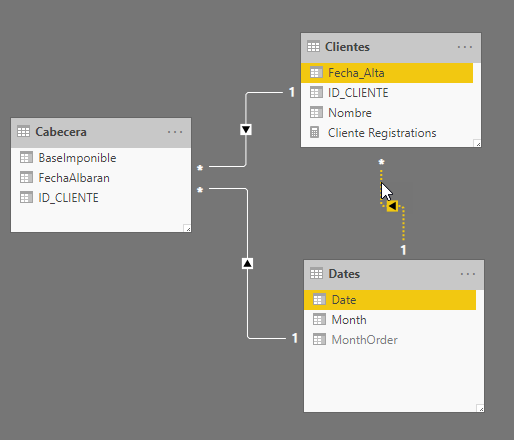
You should be able to solve this by creating an inactive relationship between the Date and Clientes tables

2020-01 inactive rel.png

Then creating a measure with the USERELATIONSHIP function to activate this relationship for that measure.

Cliente Registrations = CALCULATE( countrows(Clientes), USERELATIONSHIP(Clientes[Fecha_Alta], Dates[Date]))

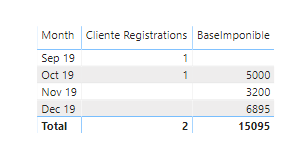
This will allow you to see other measures using the active relationship, but just for the count of client registrations to use the relationship between Clientes and Dates


eg.

2020-01 inactive rel result.png


View solution in original post

5 REPLIES 5
az38
Community Champion
Community Champion

Hi @Anonymous 

it depends on full your data model, but try to set Both direction on either Clientes-Date or Cabecera-Date relationships


do not hesitate to give a kudo to useful posts and mark solutions as solution


do not hesitate to give a kudo to useful posts and mark solutions as solution
LinkedIn
Anonymous
Not applicable

Hi @az38 


Thanks for yor answer.


I can't set both directions on the Cabecera-Date relationship because I have different measures in the Cabecera table. Some of these measures use SAMEPERIODLASTYEAR.

az38
Community Champion
Community Champion

@Anonymous 

that's what i mean: for help show please your data model (example of data, measures and point where the error appears)


do not hesitate to give a kudo to useful posts and mark solutions as solution


do not hesitate to give a kudo to useful posts and mark solutions as solution
LinkedIn
Anonymous
Not applicable

Hello


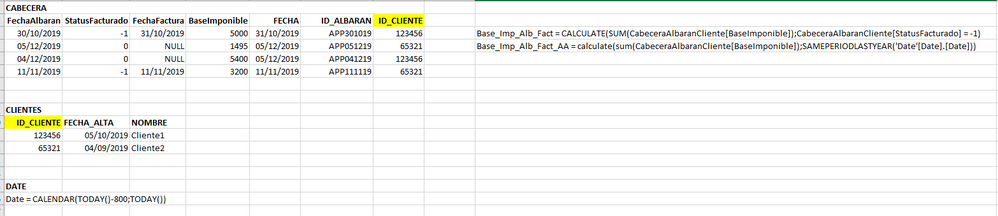
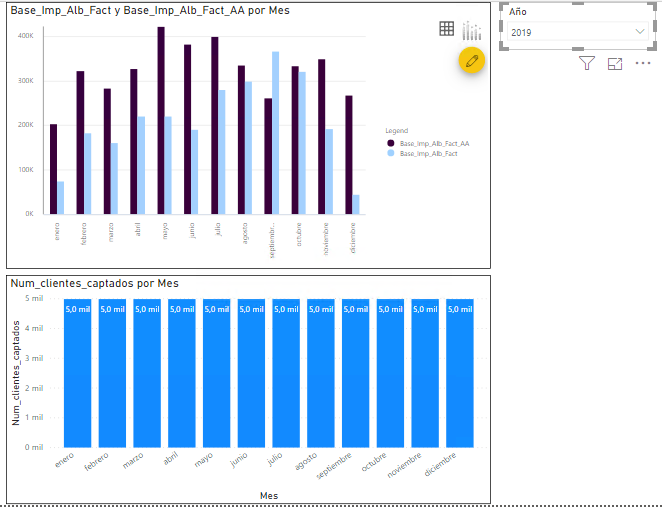
I show you a data example on the picture with the measures. The relation between Cabecera and Clientes use the ID_CLIENTE column. The relacionship between Date and Cabecera use the column FECHA.DataExample.PNG


I need to calculate the number of new customers by month (second graph) and filter all report by year. Example:


ReportExample.PNG


You should be able to solve this by creating an inactive relationship between the Date and Clientes tables

2020-01 inactive rel.png

Then creating a measure with the USERELATIONSHIP function to activate this relationship for that measure.

Cliente Registrations = CALCULATE( countrows(Clientes), USERELATIONSHIP(Clientes[Fecha_Alta], Dates[Date]))

This will allow you to see other measures using the active relationship, but just for the count of client registrations to use the relationship between Clientes and Dates


eg.

2020-01 inactive rel result.png


Helpful resources

Announcements
Power BI DataViz World Championships

Power BI Dataviz World Championships

The Power BI Data Visualization World Championships is back! Get ahead of the game and start preparing now!

December 2025 Power BI Update Carousel

Power BI Monthly Update - December 2025

Check out the December 2025 Power BI Holiday Recap!

FabCon Atlanta 2026 carousel

FabCon Atlanta 2026

Join us at FabCon Atlanta, March 16-20, for the ultimate Fabric, Power BI, AI and SQL community-led event. Save $200 with code FABCOMM.